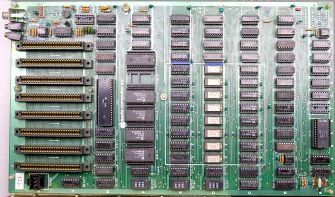
The Apple II — often styled Apple ][ — was Apple’s first mass‑market microcomputer and the machine that ignited the late‑1970s home‑computer boom. Announced at the April 1977 West Coast Computer Faire, it combined color graphics, an integrated keyboard, BASIC in ROM, and eight open expansion slots in a single plastic enclosure — a radical departure from kit‑based contemporaries.
Regular maintenance of Apple II computers primarily involves reseating chips that aren't making good connections with their sockets, which is the number one problem with early Apple II and Apple II Plus machines. Clean the motherboard and case periodically using appropriate methods. For plastic cases, use a dilute solution of 50% Clorox and 50% water with a washcloth, followed by Pledge for finishing. For internal components, remove all expansion cards and use compressed air to clear dust. Always handle ICs with care using an anti-static mat or anti-static bag, as old chips from the 70s and 80s are particularly susceptible to ESD damage. For keyboards, use an IC chip extractor to remove keycaps safely, then clean with 99% isopropyl alcohol. Store computers in climate-controlled environments to prevent oxidation and component degradation.
Common issues include display problems, boot failures, and keyboard malfunctions. If the system won't boot, first remove all expansion cards and reseat every chip on the board, then swap chips of the same type to identify failures. For no display output, check the data bus with an oscilloscope for proper signal levels. Bad RAM chips often cause green squares or bars on screen, particularly in the lowest 16K bank. For non-responsive keys, mark faulty keys during testing, then apply 99% isopropyl alcohol with a squeeze bulb at the key stem edges while repeatedly pressing the key. Use the built-in self-test routines and monitor commands for memory testing. Check power supply voltages - the +12V rail should remain above 11.4V under load, and the +5V should stay above 5V. The R/W line should toggle properly; if it never goes low, check the 74LS257 latches at B6 and B7.
RIFA metallized-paper safety capacitors in Apple II power supplies deteriorate over time and require immediate replacement to prevent catastrophic failure with smoke. Replace the X2 safety capacitors (typically 0.1µF and 0.47µF at 275VAC) every year or two as preventive maintenance. Use polypropylene film capacitors from brands like KEMET or TDK as replacements - never use new RIFA capacitors as they have the same failure mode. The Panasonic ECQ-U2A104KL fits as a direct substitute with 20mm lead spacing. Also check capacitor C7 (220µF 10V), which sits near a power resistor and frequently fails due to heat - replace with a 105°C, 16V rated capacitor. When replacing capacitors, always disconnect power and discharge the power supply completely before working. Use proper safety equipment and never work on energized circuits.
The expandable slot architecture, affordable Disk II, and the industry‑shifting spreadsheet VisiCalc made the Apple II the first commercially successful mass‑produced microcomputer, cementing Apple’s future and inspiring clones worldwide (Franklin Ace, Basis 108, ITT 2020).