

Commodore PET 2001: Difference between revisions
No edit summary |
No edit summary |
||
| (3 intermediate revisions by the same user not shown) | |||
| Line 24: | Line 24: | ||
The initial PET 2001-4 model shipped with '''4 KB of RAM''', while the PET 2001-8 offered '''8 KB of RAM'''. Later versions allowed expansion up to '''32 KB'''. The system featured a built-in '''9-inch monochrome CRT display''' with a resolution of '''40 columns × 25 rows''', driven by a simple character generator and video controller circuit. | The initial PET 2001-4 model shipped with '''4 KB of RAM''', while the PET 2001-8 offered '''8 KB of RAM'''. Later versions allowed expansion up to '''32 KB'''. The system featured a built-in '''9-inch monochrome CRT display''' with a resolution of '''40 columns × 25 rows''', driven by a simple character generator and video controller circuit. | ||
== | == Architecture and Processor == | ||
At the core of the PET 2001 is the '''MOS Technology 6502''', an 8-bit microprocessor running at '''1 MHz'''. This same CPU would go on to power many other popular systems including the Apple II and Commodore 64. The CPU was tightly integrated with the machine’s system ROM and I/O through custom logic and support chips. | At the core of the PET 2001 is the '''MOS Technology 6502''', an 8-bit microprocessor running at '''1 MHz'''. This same CPU would go on to power many other popular systems including the Apple II and Commodore 64. The CPU was tightly integrated with the machine’s system ROM and I/O through custom logic and support chips. | ||
The ROM contained '''8 KB of Commodore BASIC 1.0''', developed by Microsoft, and additional routines for input/output operations and system startup. All ROM and RAM chips were socketed on the early PET boards, making upgrades and repairs relatively straightforward. | The ROM contained '''8 KB of Commodore BASIC 1.0''', developed by Microsoft, and additional routines for input/output operations and system startup. All ROM and RAM chips were socketed on the early PET boards, making upgrades and repairs relatively straightforward. | ||
== | == Storage and I/O == | ||
Storage on the PET 2001 was provided by an integrated '''Datassette unit''' — a Commodore-branded cassette tape drive that used compact audio cassettes for digital storage. While slow and prone to alignment issues, it was far cheaper than floppy disk alternatives at the time. | Storage on the PET 2001 was provided by an integrated '''Datassette unit''' — a Commodore-branded cassette tape drive that used compact audio cassettes for digital storage. While slow and prone to alignment issues, it was far cheaper than floppy disk alternatives at the time. | ||
| Line 38: | Line 38: | ||
* Audio output via a simple piezoelectric speaker, typically used for beeps and tones. | * Audio output via a simple piezoelectric speaker, typically used for beeps and tones. | ||
== | == Video Hardware == | ||
The video system was entirely character-based, using a '''1 KB video RAM buffer''' mapped to screen memory. Each character was represented by an 8×8-pixel bitmap from a fixed character ROM, providing a consistent and readable text output. The 40-column display became standard in early PETs, though later models introduced an 80-column mode for business applications. | The video system was entirely character-based, using a '''1 KB video RAM buffer''' mapped to screen memory. Each character was represented by an 8×8-pixel bitmap from a fixed character ROM, providing a consistent and readable text output. The 40-column display became standard in early PETs, though later models introduced an 80-column mode for business applications. | ||
== | == General Maintenance == | ||
Over decades of operation, PET 2001 systems are prone to failures caused by aging electrolytic capacitors, worn-out ROM sockets, and stuck cassette mechanisms. Routine cleaning, contact reseating, and power supply testing are essential. | Over decades of operation, PET 2001 systems are prone to failures caused by aging electrolytic capacitors, worn-out ROM sockets, and stuck cassette mechanisms. Routine cleaning, contact reseating, and power supply testing are essential. | ||
For detailed cleaning, CRT safety, keyboard servicing, and PRAM battery handling (where present), see the [[Commodore PET 2001 Maintenance Guide]]. | For detailed cleaning, CRT safety, keyboard servicing, and PRAM battery handling (where present), see the [[Commodore PET 2001 General Maintenance|Commodore PET 2001 General Maintenance Guide]]. | ||
== | == PCB Schematics & Service Guide == | ||
The PET 2001 logic board layout is relatively simple, with discrete TTL logic, a MOS 6502 CPU, and rows of DRAM chips depending on the model. | The PET 2001 logic board layout is relatively simple, with discrete TTL logic, a MOS 6502 CPU, and rows of DRAM chips depending on the model. | ||
=== | === Motherboard Images === | ||
{| class="wikitable" style="width:75%; text-align:center;" | {| class="wikitable" style="width:75%; text-align:center;" | ||
|- | |- | ||
| Line 58: | Line 58: | ||
|} | |} | ||
=== | === Resources === | ||
The following pages contain the complete internal schematics and service manuals: | The following pages contain the complete internal schematics and service manuals: | ||
* '''[[Commodore PET 2001 | * '''[[:Category:Commodore PET 2001 Schematics|Commodore PET 2001 Schematics]]''' | ||
* '''[[Commodore PET 2001 Service Manual]]''' | * '''[[Commodore PET 2001 Service Manual]]''' | ||
== | == Common Issues & Troubleshooting == | ||
* '''Blank screen on power-up''': Check the 6502, RAM, and character ROMs. | * '''Blank screen on power-up''': Check the 6502, RAM, and character ROMs. | ||
* '''"garbage characters" on boot''': Often caused by faulty RAM or ROM chips. | * '''"garbage characters" on boot''': Often caused by faulty RAM or ROM chips. | ||
| Line 70: | Line 70: | ||
* '''Keyboard not responding''': PETs used a capacitive keyboard matrix prone to oxidation; see the [[Commodore PET 2001 Keyboard Repair Guide]]. | * '''Keyboard not responding''': PETs used a capacitive keyboard matrix prone to oxidation; see the [[Commodore PET 2001 Keyboard Repair Guide]]. | ||
For a full list of common faults and fixes, visit the [[Commodore PET 2001 Troubleshooting Guide]]. | For a full list of common faults and fixes, visit the [[Commodore PET 2001 Troubleshooting|Commodore PET 2001 Troubleshooting Guide]]. | ||
== | == Capacitor Replacement == | ||
While the PET series lacks the surface-mount capacitor plague seen in later machines, their power supplies and logic boards still suffer from degraded electrolytics. | While the PET series lacks the surface-mount capacitor plague seen in later machines, their power supplies and logic boards still suffer from degraded electrolytics. | ||
Refer to the [[Commodore PET 2001 Capacitor Replacement Guide]] for a complete bill of materials and safe removal/replacement procedures. | Refer to the [[Commodore PET 2001 Capacitor Replacement Guide]] for a complete bill of materials and safe removal/replacement procedures. | ||
== | == Gallery == | ||
<gallery mode="packed" heights="200"> | <gallery mode="packed" heights="200"> | ||
File:Commodore PET 2001 Front.jpg|Front view of a PET 2001-8 model | File:Commodore PET 2001 Front.jpg|Front view of a PET 2001-8 model | ||
| Line 87: | Line 87: | ||
</gallery> | </gallery> | ||
== | == Related Pages == | ||
* [[Commodore PET 2001 Maintenance | * [[Commodore PET 2001 General Maintenance]] | ||
* [[Commodore PET 2001 Troubleshooting | * [[Commodore PET 2001 Troubleshooting]] | ||
* [[Commodore PET 2001 Keyboard Repair Guide]] | * [[Commodore PET 2001 Keyboard Repair Guide]] | ||
* [[Commodore PET 2001 Capacitor Replacement Guide]] | * [[Commodore PET 2001 Capacitor Replacement Guide]] | ||
[[Category:Commodore Systems]] | [[Category:Commodore Systems]] | ||
Latest revision as of 08:10, 12 May 2025
 | |
 | |
| Commodore PET 2001 with built-in cassette drive | |
| Specifications | |
|---|---|
| Manufacturer | Commodore International |
| Type | Personal Computer |
| Released | 1977 |
| Discontinued | 1982 |
| Intro price | US$795 (2001-4), US$995 (2001-8) |
| CPU | MOS Technology 6502 @ 1 MHz |
| Memory | 4 KB – 8 KB (expandable to 32 KB) |
| Storage | Integrated cassette deck, external IEEE-488 floppy drive (optional) |
| Display | 9" monochrome built-in CRT (40x25 text) |
| Sound | None (no built-in audio hardware) |
| Dimensions | 19" H × 17" W × 19" D (approx.) |
| Weight | ~20 kg |
| OS / Firmware | Commodore BASIC 1.0 / 2.0 |
| Predecessor | None |
| Successor | Commodore PET 4000 Series |
| Codename | PET |
| Model no. | 2001-4, 2001-8 |
The Commodore PET 2001 (Personal Electronic Transactor) was Commodore’s first all-in-one personal computer, introduced in 1977 during the formative years of the personal computing industry. Designed by Chuck Peddle and his team, the PET 2001 was one of the first consumer computers to offer a fully integrated package — combining a keyboard, monochrome CRT monitor, cassette tape drive, power supply, and motherboard into a single steel enclosure.
The initial PET 2001-4 model shipped with 4 KB of RAM, while the PET 2001-8 offered 8 KB of RAM. Later versions allowed expansion up to 32 KB. The system featured a built-in 9-inch monochrome CRT display with a resolution of 40 columns × 25 rows, driven by a simple character generator and video controller circuit.
Architecture and Processor
[edit | edit source]At the core of the PET 2001 is the MOS Technology 6502, an 8-bit microprocessor running at 1 MHz. This same CPU would go on to power many other popular systems including the Apple II and Commodore 64. The CPU was tightly integrated with the machine’s system ROM and I/O through custom logic and support chips.
The ROM contained 8 KB of Commodore BASIC 1.0, developed by Microsoft, and additional routines for input/output operations and system startup. All ROM and RAM chips were socketed on the early PET boards, making upgrades and repairs relatively straightforward.
Storage and I/O
[edit | edit source]Storage on the PET 2001 was provided by an integrated Datassette unit — a Commodore-branded cassette tape drive that used compact audio cassettes for digital storage. While slow and prone to alignment issues, it was far cheaper than floppy disk alternatives at the time.
For I/O, the system included:
- A built-in IEEE-488 (GPIB) parallel interface — an uncommon but high-speed bus primarily used for connecting disk drives and printers.
- A standard PET edge connector expansion port, allowing hardware add-ons.
- Audio output via a simple piezoelectric speaker, typically used for beeps and tones.
Video Hardware
[edit | edit source]The video system was entirely character-based, using a 1 KB video RAM buffer mapped to screen memory. Each character was represented by an 8×8-pixel bitmap from a fixed character ROM, providing a consistent and readable text output. The 40-column display became standard in early PETs, though later models introduced an 80-column mode for business applications.
General Maintenance
[edit | edit source]Over decades of operation, PET 2001 systems are prone to failures caused by aging electrolytic capacitors, worn-out ROM sockets, and stuck cassette mechanisms. Routine cleaning, contact reseating, and power supply testing are essential.
For detailed cleaning, CRT safety, keyboard servicing, and PRAM battery handling (where present), see the Commodore PET 2001 General Maintenance Guide.
PCB Schematics & Service Guide
[edit | edit source]The PET 2001 logic board layout is relatively simple, with discrete TTL logic, a MOS 6502 CPU, and rows of DRAM chips depending on the model.
Motherboard Images
[edit | edit source]| Logic Board | Schematic Diagrams |
|---|---|
 |
 |
Resources
[edit | edit source]The following pages contain the complete internal schematics and service manuals:
Common Issues & Troubleshooting
[edit | edit source]- Blank screen on power-up: Check the 6502, RAM, and character ROMs.
- "garbage characters" on boot: Often caused by faulty RAM or ROM chips.
- Cassette load errors: Clean or replace the drive belt; inspect the tape head for alignment.
- Keyboard not responding: PETs used a capacitive keyboard matrix prone to oxidation; see the Commodore PET 2001 Keyboard Repair Guide.
For a full list of common faults and fixes, visit the Commodore PET 2001 Troubleshooting Guide.
Capacitor Replacement
[edit | edit source]While the PET series lacks the surface-mount capacitor plague seen in later machines, their power supplies and logic boards still suffer from degraded electrolytics.
Refer to the Commodore PET 2001 Capacitor Replacement Guide for a complete bill of materials and safe removal/replacement procedures.
Gallery
[edit | edit source]-
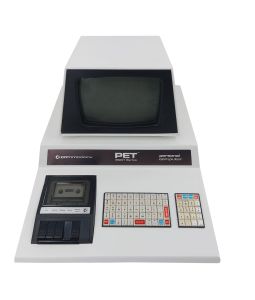 Front view of a PET 2001-8 model
 -
 Side view of a PET 2001-8 model
 -
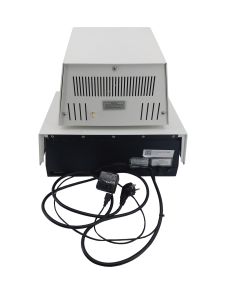 Rear panel showing ports and vents
 -
 Open view of a PET 2001-8 model
 -
 Integrated Compact Cassette Drive
 -
 Early "chiclet" keyboard layout


