

Commodore PET 4000 Series: Difference between revisions
No edit summary |
No edit summary |
||
| (6 intermediate revisions by the same user not shown) | |||
| Line 1: | Line 1: | ||
{{Infobox computer | {{Infobox computer | ||
| name = Commodore PET 4000 Series | | name = Commodore PET 4000 Series | ||
| image = [[File:Commodore PET 4032.jpg|250px]] | | image = [[File:Commodore PET 4032 Side.jpg|250px]] | ||
| caption = Commodore PET 4032 with 12" monitor | | caption = Commodore PET 4032 with 12" monitor | ||
| manufacturer = Commodore International | | manufacturer = Commodore International | ||
| Line 21: | Line 21: | ||
| model = 4008, 4016, 4032 | | model = 4008, 4016, 4032 | ||
| logo = [[File:Commodore PET logo-03.svg|250px]] | | logo = [[File:Commodore PET logo-03.svg|250px]] | ||
}} | }}The '''Commodore PET 4000 Series''' was introduced in 1980 as an evolution of the earlier PET 2001 and 3000 series. Designed for educational and business environments, the 4000 series featured improved hardware, expanded memory options, and the more advanced Commodore BASIC 4.0. | ||
== Architecture and Processor == | |||
The CPU within the PET 4000 series is the '''MOS Technology 6502''', an 8-bit microprocessor operating at '''1 MHz'''. This processor was widely used in various Commodore systems, partly due to Commodore buying MOS. | |||
== | |||
The systems came equipped with '''Commodore BASIC 4.0''' in ROM, offering enhanced disk operations and programming capabilities over previous BASIC versions. | The systems came equipped with '''Commodore BASIC 4.0''' in ROM, offering enhanced disk operations and programming capabilities over previous BASIC versions. | ||
== | == Storage and I/O == | ||
While the PET 4000 series did not include an internal cassette drive, it supported external storage options: | While the PET 4000 series did not include an internal cassette drive, it supported external storage options: | ||
| Line 38: | Line 36: | ||
These interfaces provided flexibility in storage solutions, catering to various user needs. | These interfaces provided flexibility in storage solutions, catering to various user needs. | ||
== | == Video Hardware == | ||
The video system utilized a character-based display, presenting text in a '''40x25''' format on either a 9" or 12" monochrome CRT monitor. The display was driven by a character generator ROM, ensuring clear and consistent text output suitable for programming and data entry tasks. | The video system utilized a character-based display, presenting text in a '''40x25''' format on either a 9" or 12" monochrome CRT monitor. The display was driven by a character generator ROM, ensuring clear and consistent text output suitable for programming and data entry tasks. | ||
== | == General Maintenance == | ||
Over time, PET 4000 series computers may experience issues common to vintage electronics, such as: | Over time, PET 4000 series computers may experience issues common to vintage electronics, such as: | ||
| Line 50: | Line 48: | ||
Regular maintenance, including capacitor replacement, keyboard cleaning, and CRT adjustments, can help preserve the functionality of these systems. | Regular maintenance, including capacitor replacement, keyboard cleaning, and CRT adjustments, can help preserve the functionality of these systems. | ||
== | == PCB Schematics & Service Guide == | ||
Detailed schematics and service manuals are available for those interested in in-depth technical information. | |||
=== 📷 Motherboard Images === | === 📷 Motherboard Images === | ||
{| class="wikitable" style="width: | {| class="wikitable" style="width:70%; text-align:center;" | ||
|- | |- | ||
! Logic Board !! Schematic Diagrams | ! Logic Board !! Schematic Diagrams | ||
| Line 62: | Line 60: | ||
|} | |} | ||
=== | === Resources === | ||
The following pages provide | The following pages provide PET 4000 technical documentation: | ||
* '''[[Commodore PET 4000 Series Logic Board Schematics]]''' | * '''[[Commodore PET 4000 Series Logic Board Schematics]]''' | ||
* '''[[Commodore PET 4000 Series | * '''[[Commodore PET 4000 Series Technical Manual]]''' | ||
== | == Common Issues & Troubleshooting == | ||
Common issues with the PET 4000 series include: | Common issues with the PET 4000 series include: | ||
| Line 77: | Line 75: | ||
For detailed troubleshooting steps, refer to the [[Commodore PET 4000 Series Troubleshooting Guide]]. | For detailed troubleshooting steps, refer to the [[Commodore PET 4000 Series Troubleshooting Guide]]. | ||
== | == Capacitor Replacement == | ||
Replacing aged electrolytic capacitors is crucial for maintaining system stability. The [[Commodore PET 4000 Series Capacitor Replacement Guide]] offers a step-by-step process for identifying and replacing these components. | Replacing aged electrolytic capacitors is crucial for maintaining system stability. The [[Commodore PET 4000 Series Capacitor Replacement Guide]] offers a step-by-step process for identifying and replacing these components. | ||
== | == Gallery == | ||
<gallery mode="packed" heights="200"> | <gallery mode="packed" heights="200"> | ||
File:Commodore PET 4032 Front.jpg|Front view of a PET 4032 model | File:Commodore PET 4032 Front.jpg|Front view of a PET 4032 model | ||
Latest revision as of 08:17, 12 May 2025
 | |
 | |
| Commodore PET 4032 with 12" monitor | |
| Specifications | |
|---|---|
| Manufacturer | Commodore International |
| Type | Personal Computer |
| Released | 1980 |
| Discontinued | 1982 |
| Intro price | Varies by model and configuration |
| CPU | MOS Technology 6502 @ 1 MHz |
| Memory | 8 KB – 32 KB (model dependent) |
| Storage | External IEEE-488 floppy drive (optional) |
| Display | 9" or 12" monochrome built-in CRT (40x25 text) |
| Sound | Piezoelectric beeper |
| Dimensions | Varies by model |
| Weight | Varies by model |
| OS / Firmware | Commodore BASIC 4.0 |
| Predecessor | Commodore PET 2001 |
| Successor | Commodore CBM 8000 Series |
| Codename | CBM |
| Model no. | 4008, 4016, 4032 |
The Commodore PET 4000 Series was introduced in 1980 as an evolution of the earlier PET 2001 and 3000 series. Designed for educational and business environments, the 4000 series featured improved hardware, expanded memory options, and the more advanced Commodore BASIC 4.0.
Architecture and Processor
[edit | edit source]The CPU within the PET 4000 series is the MOS Technology 6502, an 8-bit microprocessor operating at 1 MHz. This processor was widely used in various Commodore systems, partly due to Commodore buying MOS.
The systems came equipped with Commodore BASIC 4.0 in ROM, offering enhanced disk operations and programming capabilities over previous BASIC versions.
Storage and I/O
[edit | edit source]While the PET 4000 series did not include an internal cassette drive, it supported external storage options:
- IEEE-488 (GPIB) interface: Allowed connection to external devices such as the Commodore 4040 dual floppy disk drive.
- Dual datasette ports: Supported external cassette tape drives for data storage and retrieval.
These interfaces provided flexibility in storage solutions, catering to various user needs.
Video Hardware
[edit | edit source]The video system utilized a character-based display, presenting text in a 40x25 format on either a 9" or 12" monochrome CRT monitor. The display was driven by a character generator ROM, ensuring clear and consistent text output suitable for programming and data entry tasks.
General Maintenance
[edit | edit source]Over time, PET 4000 series computers may experience issues common to vintage electronics, such as:
- Aging capacitors leading to power supply instability.
- Keyboard contact wear causing unresponsive keys.
- CRT display degradation affecting screen clarity.
Regular maintenance, including capacitor replacement, keyboard cleaning, and CRT adjustments, can help preserve the functionality of these systems.
PCB Schematics & Service Guide
[edit | edit source]Detailed schematics and service manuals are available for those interested in in-depth technical information.
📷 Motherboard Images
[edit | edit source]| Logic Board | Schematic Diagrams |
|---|---|
 |

Resources
[edit | edit source]The following pages provide PET 4000 technical documentation:
Common Issues & Troubleshooting
[edit | edit source]Common issues with the PET 4000 series include:
- Display anomalies: Often due to aging capacitors or CRT issues.
- Keyboard malfunctions: Typically caused by worn contacts or debris.
- Boot failures: May result from faulty ROM chips or power supply problems.
For detailed troubleshooting steps, refer to the Commodore PET 4000 Series Troubleshooting Guide.
Capacitor Replacement
[edit | edit source]Replacing aged electrolytic capacitors is crucial for maintaining system stability. The Commodore PET 4000 Series Capacitor Replacement Guide offers a step-by-step process for identifying and replacing these components.
Gallery
[edit | edit source]-
Front view of a PET 4032 model
-
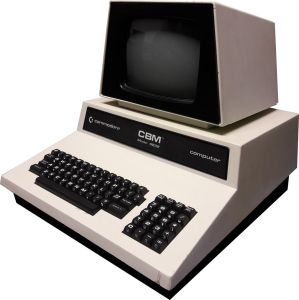 Side view of a PET 4032 model
 -
Rear panel showing ports and vents
-
Open view of a PET 4032 model
-
Full-sized keyboard layout


