# '''CRT Safety''': Fully discharge the CRT and ensure the system is unplugged.
# '''CRT Safety''': Fully discharge the CRT and ensure the system is unplugged.
Line 48:
Line 44:
* Anti-static brush, isopropyl alcohol
* Anti-static brush, isopropyl alcohol
* Safety glasses and insulated gloves
* Safety glasses and insulated gloves
:[[File:MacintoshPlus_RepairTools.jpg|thumb|300px|Tools for recapping]]
=== Voltage Adjustment Post-Recap ===
=== Voltage Adjustment Post-Recap ===
Revision as of 20:09, 12 March 2025
Replacing electrolytic capacitors (recapping) in your Macintosh Plus is crucial for ensuring reliability, stable voltages, and a crisp video image. Due to age, capacitors can dry out, leak, or lose effectiveness.
Capacitor Inspection
Regularly inspect capacitors for these signs of failure:
Bulging Tops: A dome-shaped or expanded capacitor top.
Leaking electrolyte: Brownish or white crust near capacitor leads.
Corrosion: Discoloration or corrosion on the PCB around capacitors.
Capacitor List
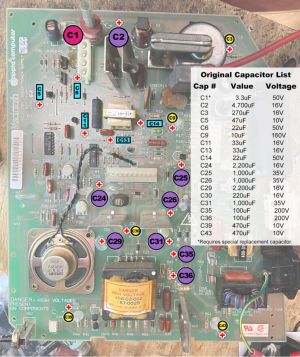
Replace all major capacitors proactively to prevent potential failures. Here is the detailed list:
Analog Board Capacitors
C1: 3.9µF 35 V non-polarized (recommended replacement: 4.7µF 100V non-polar film capacitor)
Main Filter Capacitor: 4700µF (270 V rating, X, axial) (RIFA)