

Macintosh Plus Capacitor Replacement Guide
Replacing electrolytic capacitors (recapping) in your Macintosh Plus is crucial for ensuring reliability, stable voltages, and a crisp video image. Due to age, capacitors can dry out, leak, or lose effectiveness.
Capacitor Inspection
Regularly inspect capacitors for these signs of failure:
- Bulging Tops: A dome-shaped or expanded capacitor top.
- Leaking electrolyte: Brownish or white crust near capacitor leads.
- Corrosion: Discoloration or corrosion on the PCB around capacitors.
Capacitor List
Replace all major capacitors proactively to prevent potential failures. Here is the detailed list:
- Analog Board Capacitors
- C1: 3.9µF 35 V non-polarized (recommended replacement: 4.7µF 100V non-polar film capacitor)
- Main Filter Capacitor: 4700µF (270 V rating, X, axial) (RIFA)
- High-voltage Capacitors: 10µF (160 V)
- Medium-value Capacitors: 22µF, 33µF, 47µF (typically 16–50 V)
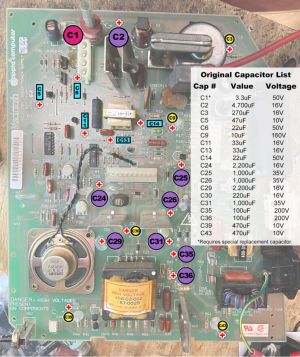
Analog board capacitor locations

- Logic Board Capacitors
The logic board rarely needs recapping but if done, these capacitors are required:
- 5x 33µF (16 V axial capacitors)
- 1x 1µF (50 V axial capacitor)
Capacitor Replacement Procedure
- CRT Safety: Fully discharge the CRT and ensure the system is unplugged.
- Disassembly: Remove analog board carefully, noting connector placements.
- Desoldering: Carefully desolder old capacitors, using a solder sucker or braid.
- Replacement: Install new capacitors with correct polarity (observe + and - markings).
- Soldering: Solder the new capacitor leads and trim excess lead length.
- Inspection: Check all solder joints to confirm clean, secure connections.
- Final Check: Verify no shorts between power rails with a multimeter before powering on.
Recommended Tools
- Soldering iron (temperature-controlled recommended)
- Desoldering pump or braid
- Multimeter (for voltage verification)
- Anti-static brush, isopropyl alcohol
- Safety glasses and insulated gloves
Voltage Adjustment Post-Recap
After recapping, verify and adjust voltages for optimal stability:
- +5 V Line: Should measure between 4.85 V–5.15 V
- +12 V Line: Should measure around 11.9–12.7 V
- Adjust using the trim potentiometer (R56) on the analog board as needed.
Additional Tips
- Periodically power on the Macintosh Plus to maintain capacitor health.
- Always dispose of old capacitors responsibly.