
Macintosh Classic II Capacitor Replacement Guide
Replacing electrolytic capacitors (recapping) in your Macintosh Classic II is essential for restoring power stability, ensuring clean video output, and preventing long‑term damage due to leakage. This guide outlines the recommended procedure and provides complete analog and logic board capacitor specifications.
🔍 Capacitor Inspection
Before recapping, visually inspect all capacitors for common signs of failure:
- Bulging Tops – Swollen or domed caps indicate internal gas buildup.
- Electrolyte Leakage – Brown/white crust or residue near leads shows failure.
- Corroded Pads or Traces – PCB staining or corrosion suggests damage.
If any symptoms are present, immediate replacement is advised.
📋 Macintosh Classic II Capacitor List
🧯 Analog Board Capacitors
The Classic II shares its analog board with the Classic. Due to board revisions, labels may vary—always verify against your schematic.
| Label | Capacitance | Voltage | Qty |
|---|---|---|---|
| CF3 | 1000 µF | 16 V | 1 |
| CF4 | 470 µF | 25 V | 1 |
| CL1 | 1000 µF | 25 V | 1 |
| CL2 | 4.7 µF | 250 V | 1 |
| CL3 | 1 µF | 50 V | 1 |
| CP1 | 220 µF | 250 V | 1 |
| CP10 | 470 µF | 25 V | 1 |
| CP11 | 220 µF | 50 V | 1 |
| CP12 | 1000 µF | 16 V | 1 |
| CP13 | 220 µF | 250 V | 1 |
| CP2 | 470 µF | 50 V | 1 |
| CP34 | 1 µF | 50 V | 1 |
| CP36 | 2200 µF | 10 V | 1 |
| CP4 | 47 µF | 25 V | 1 |
| CP5 | 1 µF | 50 V | 1 |
| CP6 | 2200 µF | 10 V | 1 |
| CP7 | 1000 µF | 10 V | 1 |
| CP8 | 2200 µF | 16 V | 1 |
| CP9 | 470 µF | 25 V | 1 |
| CV2 | 470 µF | 10 V | 1 |
| CP3 | 10 µF | 25 V | 1 |
| CP37 | 1 µF | 50 V | 1 |
| CL11 | 47 µF | 16 V | 1 |
| CF2 | 220 µF | 16 V | 1 |
| CF1 | 47 µF | 25 V | 1 |
- Note: Values may vary between revisions—always cross-check your board.*

🔧 Logic Board Capacitors
Two logic board revisions exist—Rev A has 13 caps, Rev B has 17.
| Revision | Value | Voltage | Qty |
|---|---|---|---|
| Rev A | 47 µF | 16 V | 3 |
| 10 µF | 16 V | 8 | |
| 1 µF | 50 V | 2 | |
| Rev B | 47 µF | 16 V | 3 |
| 10 µF | 16 V | 12 | |
| 1 µF | 50 V | 2 |
- Tip: If substituting tantalum, choose 25 V ratings for the 47 µF positions.*
-
 Macintosh Classic II (Rev A) Logic Board Recap Diagram
 -
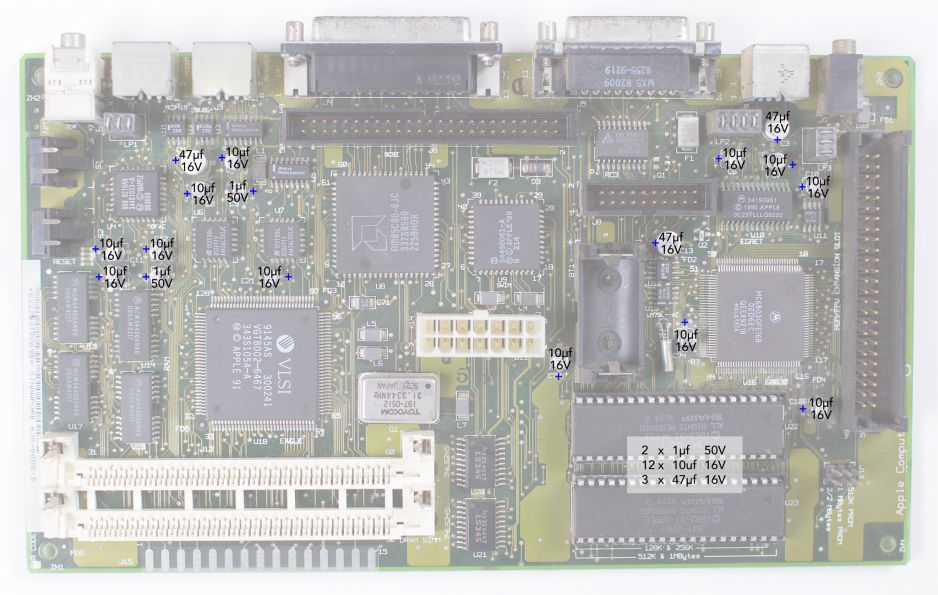 Macintosh Classic II (Rev B) Logic Board Recap Diagram
_recapping.jpg)
_Recapping.jpg)
🛠️ Capacitor Replacement Procedure
- Discharge the CRT – Follow standard CRT discharge steps before opening the case.
- Remove the Boards – Label connectors; carefully extract the logic and analog boards.
- Desolder Old Caps – Use a temperature‑controlled iron with braid or pump for clean removal.
- Clean the PCB – Remove all electrolyte residue with 99 % IPA and an ESD‑safe brush.
- Install New Caps – Observe polarity (negative stripe); seat flush to the board.
- Solder Carefully – Aim for shiny, sloped joints; avoid cold bridges.
- Trim Leads & Inspect – Cut excess lead length and check with magnification.
- Test for Shorts – Verify with a multimeter across each power rail.
🧰 Recommended Tools
- Temperature‑controlled soldering iron (fine tip)
- Desoldering braid or vacuum pump
- Leaded solder, ~0.5 mm diameter
- 99 % isopropyl alcohol & ESD‑safe brush
- Multimeter
- Safety goggles & insulated gloves
⚙️ Voltage Adjustment After Recap
With boards reinstalled, measure at the floppy‑drive power pins:
- +5 V rail: 4.90 – 5.15 V
- +12 V rail: 11.9 – 12.7 V
Use the analog board’s variable resistor (PP1) to fine‑tune.
💡 Tips for Best Results
- Recap the logic board first—its leakage often damages the analog side.
- Use top‑tier caps (Nichicon, Panasonic, Rubycon).
- Power on the machine periodically after recap to “exercise” new caps.
- Replace complete sets for uniform aging and reliability.
- Always clean the board thoroughly post‑recap.
🔗 Related Pages
- Macintosh Classic / Classic II General Maintenance
- Macintosh Classic / Classic II Troubleshooting
- Macintosh Floppy Drive Maintenance
- CRT Discharge Procedure