

Amstrad PC1512
 | |
| PC1512 with the PC-CM colour monitor, at the National Museum of Computing | |
| Specifications | |
|---|---|
| Manufacturer | Amstrad plc |
| Type | IBM PC-compatible personal computer |
| Released | 1986 |
| Intro price | From £399 plus VAT |
| CPU | Intel 8086 at 8 MHz (MBL8086-2P) |
| Memory | 512 KB, expandable on the main board to 640 KB |
| Storage | One or two 360 KB 5.25-inch drives, or one drive and a 10 or 20 MB hard disc |
| Display | Built-in CGA-compatible adaptor with an extra 640 × 200 16-colour mode; PC-MM monochrome or PC-CM colour monitor |
| Sound | Internal speaker with volume control |
| Ports / interface | RS-232 serial, parallel, mouse, light pen, keyboard (with joystick port on the keyboard) |
| Expansion | Three full-length 8-bit ISA slots |
| Power | Supplied by the monitor through a 14-way DIN cable |
| Dimensions | 372 × 384 × 135 mm (system unit) |
| Weight | 6.05 kg (SD), 7.75 kg (DD) system unit |
| OS / Firmware | MS-DOS 3.2, DOS Plus 1.2, GEM |
| Successor | Amstrad PC1640 |
| Model no. | PC1512 SD, DD, HD10, HD20 |
The Amstrad PC1512 is Amstrad's first IBM PC-compatible computer, launched in 1986. It has an 8 MHz 8086, 512 KB of RAM, a CGA-compatible display adaptor on the main board and one or two 360 KB floppy drives or a hard disc. The system unit has no power supply of its own: it is powered from the monitor, a PC-MM monochrome or PC-CM colour unit, through a 14-way DIN cable.[1][2] It was advertised from £399 plus VAT and sold under the Schneider name in Germany.[3]
History
[edit | edit source]Wikipedia gives the launch as 1986, with prices advertised from £399 plus VAT, and US sales through Vidco Inc. from the start of 1987.[3] DOS Days lists the UK prices of each variant, from £375 for a PC1512 SD with the monochrome monitor to £819 for an HD20 with the colour monitor.[4] The system unit has no fan, because the supply and its heat are in the monitor. Rumours that the machine overheated led Amstrad to fit a cooling fan to later machines; DOS Days says Alan Sugar announced a fan for every PC1512 with a hard disc.[3][4] John Elliott's Amstrad XT pages give the internal codename as AIRO and record the PC1512 also being sold as the Sinclair PC500; Amstrad's US model was the PC5120.[5][6] It shipped with MS-DOS 3.2, Digital Research's DOS Plus 1.2, the GEM desktop and Locomotive BASIC 2.[5][3] The Amstrad PC1640 followed in 1987.
Version 1 and version 2
[edit | edit source]The design changed during production. Elliott and DOS Days describe a version 2 case with ventilation slots in the top and side, a red and grey logo where the first machines have a brown one, and mounting points for a fan under the left-hand drive bay. The version 2 BIOS shows "(v2)" at start-up with a 1987 copyright date, and its CGA character ROM adds a Greek set.[7][4] Two main board layouts exist, told apart by the empty sockets for the 640 KB upgrade under the left-hand drive bay: the earlier board has eighteen 16-pin sockets for 4164 DRAMs, the later one six (two 16-pin and four 18-pin) for two 4164s and four 41464s.[8] DOS Days counts sixteen sockets on the earlier board; Wikipedia also gives sixteen 4164-120 chips for the upgrade.[4][3]
Hardware
[edit | edit source]The CPU board is Amstrad part MC0032B, with the keyboard controller on its own board, MK002A, inside the keyboard. The parts list on page 19 of the service manual gives these main ICs:[1]
| IC | Part | Function |
|---|---|---|
| IC120 | MBL8086-2P | CPU |
| IC130 | µPD8237AC-5 | DMA controller |
| IC109 | MBL8259A-2P | Interrupt controller |
| IC114 | µPD8253C-5 | Interval timer |
| IC112 | µPD765AC-2 | Floppy disc controller |
| IC106 | INS8250N | Serial port UART |
| IC134 | MC146818P | Real-time clock and NVR |
| IC135–152 | MN41256-15 | 18 × 256K DRAM (512 KB with parity) |
| IC118, 125, 126, 127 | AMS40040, AMS40039, AMS40041, AMS40045 | Amstrad custom devices |
| IC129, IC132 | AMS40043, AMS40044 | System ROMs[9] |
| IC801 | AMS40042 | Keyboard controller (keyboard PCB) |
| IC401 | LA4140 | Speaker amplifier |
DOS Days, writing about the PC1640, which uses the same three large Amstrad devices, describes them as Toshiba gate arrays: 40039 for the bus, 40040 for memory and 40041 for peripheral glue logic.[10] The crystals are X101 1.8432 MHz, X103 32.768 kHz for the clock, X104 24.0 MHz, X105 28.636 MHz and a 6.0 MHz ceramic resonator, X801, for the keyboard processor.[1]
Connectors and links
[edit | edit source]The system unit has a 14-way DIN socket for power from the monitor and an 8-way DIN socket for video, a 6-way DIN keyboard socket, a 9-way D mouse socket, DB-25 serial and parallel ports, and a 6-way light pen header under the expansion slot cover. Each expansion slot may draw up to 900 mA at +5 V, 50 mA at +12 V, 50 mA at −12 V and 33 mA at −5 V.[2]
| Pin | Assignment | Maximum current |
|---|---|---|
| 3, 5 | +5 V (joined on the board) | 7.00 A total |
| 11 | +12 V | 4.9 A |
| 9 | −12 V | 0.24 A |
| 13 | −5 V | 1 A |
| 2, 4, 8, 10, 12 | 0 V | – |
| 1, 6, 7, 14 | Not connected | – |
DOS Days prints the same pinout for owners who want to run the system unit from a separate supply.[4] The video socket carries a combined horizontal and vertical sync on pin 1; DOS Days notes that this makes the PC1512's monitors almost useless with other computers.[2][4]
The PC1512 has no DIP switches. Eight option links on the main board select the language of the BIOS messages (LK1–LK3, with all three fitted giving a diagnostic mode that skips most of the self-test), the memory size (LK4, 512 or 640 KB), the ROM size (LK5), the character set of the display adaptor (LK6, LK7) and the floppy READY line (LK8).[11]
Power and monitors
[edit | edit source]The supply for the whole computer is on the monitor's main board. The PC-MM uses a 340AXBWDN tube and the PC-CM an M34EAQ10X-AT1460/90; both have a 3.15 A time-lag mains fuse.[1] The PC-CM parts list has two switching transformers, T501 and T601, with presets VR601–VR606 setting the computer's rails; the PC-MM has one, T501, with presets VR501–VR507.[1] The real-time clock and its 50 bytes of configuration RAM are kept alive by four non-rechargeable AA cells, which DOS Days places in a tray under the monitor.[2][4] The PC1640's monitors use a 9-way D connector for video where the PC-MM and PC-CM use an 8-way DIN plug, and the two families are not interchangeable without rewiring.[12]
Repair guides
[edit | edit source]- Amstrad PC1512 Maintenance Guide – battery tray, case, drives, memory upgrade and supply adjustment
- Amstrad PC1512 Troubleshooting Guide – power-on self-test messages, power, display, drive and keyboard faults
- Amstrad PC1512 Capacitor Replacement Guide – the electrolytics in the PC-MM and PC-CM supplies
Documentation
[edit | edit source]- Amstrad PC1512 Service Manual – Amstrad's service manual for the PC1512, PC-MM and PC-CM
- PC1512 Technical Reference Manual, transcribed by John Elliott at seasip.info
- Amstrad PC1512 User Manual, Book 1, scanned on archive.org
Gallery
[edit | edit source]-
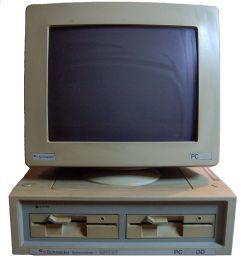 Schneider-badged PC1512 DD
 -
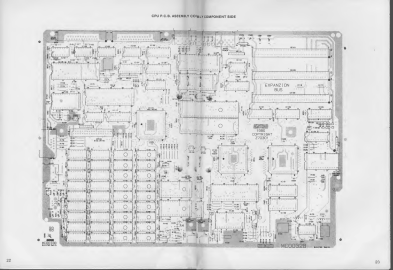 CPU board MC0032B (service manual pp. 22–23)
 -
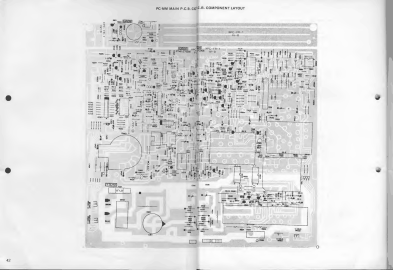 PC-MM main board, which carries the supply (service manual p. 42)


Related pages
[edit | edit source]- Amstrad PC1640 · Amstrad PC2086
- Battery Explosion, Capacitor or Corrosion Damage · Floppy Drive Repair · CRT Discharge Procedure
References
[edit | edit source]- ↑ 1.0 1.1 1.2 1.3 1.4 Amstrad plc, PC1512 Personal Computer, PC-MM Monochrome Monitor, PC-CM Colour Monitor Service Manual. Hosted as File:Amstrad PC1512 Service Manual.pdf, described at Amstrad PC1512 Service Manual. Technical specification and dimensions p. 2; servicing note p. 3; electrical parts lists pp. 18–20; alignment instructions pp. 26–27.
- ↑ 2.0 2.1 2.2 2.3 Amstrad, PC1512 Technical Reference Manual, section 1, transcribed by John Elliott: seasip.info. Retrieved 2026-10-02. Sections 1.9 (real-time clock and its four AA cells), 1.19 (expansion slot power limits), 1.20 (video connector) and 1.21 (power connector pinout and current ratings).
- ↑ 3.0 3.1 3.2 3.3 3.4 Wikipedia, "Amstrad PC1512" (revision 1358914862). Retrieved 2026-10-02. Launch in 1986 at prices from £399 plus VAT, US sales by Vidco from early 1987, the supply in the monitor and the overheating rumours, later models with a fan, the bundled software.
- ↑ 4.0 4.1 4.2 4.3 4.4 4.5 4.6 DOS Days, "Amstrad PC1512 and PC1640". Retrieved 2026-10-02. UK prices of each variant, the monitor types, the AA battery tray under the monitor, the two PC1512 main board memory layouts, the 14-pin DIN power pinout, the non-standard video signal of the PC1512 monitors, the fan announcement for hard disc models.
- ↑ 5.0 5.1 John Elliott, "Amstrad XTs: Models", seasip.info, 19 April 2013. Retrieved 2026-10-02. The PC1512 specification, the AIRO codename, the Sinclair PC500 name, the plastic case with metal shields, the "sunroof" over the expansion slots.
- ↑ Wikipedia, "Amstrad" (revision 1373433025), section on IBM PC compatibles. Retrieved 2026-10-02. The PC1512 marketed in the United States as the PC5120, and the Sinclair PC500 as a rebadged PC1512.
- ↑ John Elliott, "PC1512 v2 differences", seasip.info, 26 June 2019. Retrieved 2026-10-02. Case, logo, ventilation and fan mounting changes, the v2 BIOS and CGA ROM, and the two main board memory layouts.
- ↑ John Elliott, "Amstrad XTs: Memory Upgrades", seasip.info, 26 June 2019. Retrieved 2026-10-02. The two PC1512 upgrade socket layouts, the chips needed, LK4, and EMS cards.
- ↑ GearTechWolf, "Sinclair PC500 (rebadged Amstrad PC1512) monitor/power-supply board reconstruction", Vintage Computer Federation Forums, 2015–2017. Retrieved 2026-10-02. Community report: the main board chips 40043-1 and 40044-1 marked as system ROM and 40078 as VDU ROM; the damaged monitor/supply board and its STK7358 position.
- ↑ DOS Days, "The Amstrad PC1640 Project – Part 1", 17 August 2026. Retrieved 2026-10-02. The Toshiba gate arrays 40039T, 40040T and 40041T, the main board revisions, the Paradise PEGA1A, the drive select jumpers.
- ↑ John Elliott, "PC1512 motherboard links", seasip.info, 22 August 2003. Retrieved 2026-10-02. LK1–LK8 and their settings, from the Technical Reference Manual and the service manual schematic.
- ↑ VintageVic and others, "Amstrad 1640 and PC-MM monitor – can they be made to work together?", Vintage Computer Federation Forums, February–March 2025. Retrieved 2026-10-02. Community discussion: the PC-MM's round 8-pin DIN video plug against the PC1640's 9-way D socket, and the different sync arrangements of the two monitor families.