

Category:Repair Guides: Difference between revisions
List the general guides and Psion repair pages that were missing; drop invented 'repairs covered' list and red Component Diagnosis category; descriptions match the pages; add parent category |
|||
| Line 4: | Line 4: | ||
}} | }} | ||
== Overview == | == Overview == | ||
The '''Repair Guides''' category | The '''Repair Guides''' category collects repair procedures that apply across machines: recapping, drives, batteries, safety and plastics. Machine-specific guides are in the maintenance, troubleshooting and capacitor categories below. | ||
== Featured | == Featured repair guides == | ||
{| class="wikitable" style="width:100%; text-align:center; background-color:#f8f8f8; border-radius:8px;" | {| class="wikitable" style="width:100%; text-align:center; background-color:#f8f8f8; border-radius:8px;" | ||
|- | |- | ||
! style="background-color:#6CAEE0; color:white;" | Guide !! style="background-color:#6CAEE0; color:white;" | Devices | ! style="background-color:#6CAEE0; color:white;" | Guide !! style="background-color:#6CAEE0; color:white;" | Devices covered | ||
|- | |- | ||
| | | [[Floppy Drive Repair]] || Cleaning, alignment and common faults of 5.25-inch and 3.5-inch floppy drives. | ||
|- | |- | ||
| | | [[:Category:Capacitor Replacement Guides|Capacitor Replacement Guides]] || Recapping guides for each machine. | ||
|- | |- | ||
| | | [[CRT Discharge Procedure]] || Discharging the CRT in monitors and all-in-one computers before working on them. | ||
|- | |- | ||
| | | [[Hard Drive Maintenance and Repair]] || Stiction, head bumpers, controller boards and what can be repaired. | ||
|- | |- | ||
| | | [[Battery Refurbishment]] || Rebuilding battery packs. | ||
| | |||
|} | |} | ||
== | == General guides == | ||
* Capacitor | * [[Capacitor Failure Symptoms]] – recognising failed capacitors. | ||
* | * [[Battery Explosion, Capacitor or Corrosion Damage]] – repairing boards damaged by leaking batteries or capacitors. | ||
* [[Recommended Tools]] – tools for repair work. | |||
* | * [[Retrobrite]] – reducing the yellowing of ABS plastic cases. | ||
* | * [[Maintenance Guides]] | ||
* | |||
== Related | == Psion repairs == | ||
* [[:Category:Troubleshooting Guides|Troubleshooting Guides]] – | * Hinges: [[Psion Series 3 Hinge Repair|Series 3]] · [[Psion Series 3a Hinge Repair|Series 3a]] · [[Psion Series 3c Hinge Repair|Series 3c]] · [[Psion Series 3mx Hinge Repair|Series 3mx]] · [[Psion Series 5 Hinge Cable Repair|Series 5 hinge cable]] · [[Psion Series 5mx Hinge Repair|Series 5mx]] | ||
* [[:Category: | * Batteries: [[Psion Revo Battery Replacement|Revo]] · [[Psion Series 7 Battery Service|Series 7]] · [[Psion netBook Battery Service|netBook]] · [[Psion netBook Pro Battery Service|netBook Pro]] | ||
* [[:Category: | |||
== Related categories == | |||
* [[:Category:Maintenance Guides|Maintenance Guides]] – cleaning and preventive care. | |||
* [[:Category:Troubleshooting Guides|Troubleshooting Guides]] – symptom-based fault-finding. | |||
* [[:Category:Capacitor Replacement Guides|Capacitor Replacement Guides]] | |||
* [[:Category:Storage Devices|Storage Devices]] – floppy and hard drives. | |||
[[Category:Vintage Computers]] | |||
Latest revision as of 13:15, 30 September 2026
| Repair Guides |
|---|
| Step-by-step Repairs for Vintage Computers, Consoles, and Electronics |
Overview
[edit | edit source]The Repair Guides category collects repair procedures that apply across machines: recapping, drives, batteries, safety and plastics. Machine-specific guides are in the maintenance, troubleshooting and capacitor categories below.
Featured repair guides
[edit | edit source]| Guide | Devices covered |
|---|---|
| Floppy Drive Repair | Cleaning, alignment and common faults of 5.25-inch and 3.5-inch floppy drives. |
| Capacitor Replacement Guides | Recapping guides for each machine. |
| CRT Discharge Procedure | Discharging the CRT in monitors and all-in-one computers before working on them. |
| Hard Drive Maintenance and Repair | Stiction, head bumpers, controller boards and what can be repaired. |
| Battery Refurbishment | Rebuilding battery packs. |
General guides
[edit | edit source]- Capacitor Failure Symptoms – recognising failed capacitors.
- Battery Explosion, Capacitor or Corrosion Damage – repairing boards damaged by leaking batteries or capacitors.
- Recommended Tools – tools for repair work.
- Retrobrite – reducing the yellowing of ABS plastic cases.
- Maintenance Guides
Psion repairs
[edit | edit source]- Hinges: Series 3 · Series 3a · Series 3c · Series 3mx · Series 5 hinge cable · Series 5mx
- Batteries: Revo · Series 7 · netBook · netBook Pro
Related categories
[edit | edit source]- Maintenance Guides – cleaning and preventive care.
- Troubleshooting Guides – symptom-based fault-finding.
- Capacitor Replacement Guides
- Storage Devices – floppy and hard drives.
Subcategories
This category has the following 4 subcategories, out of 4 total.
Pages in category "Repair Guides"
The following 36 pages are in this category, out of 36 total.
A
D
P
- PDP-11/44 Power Supply Guide
- PDP-11/70 Power Supply Service
- PDP-8 Power Supply Restoration
- PDP-8/e Power Supply Guide
- Psion netBook Battery Service
- Psion netBook Pro Battery Service
- Psion Organiser Datapak Repair
- Psion Organiser II Datapak Repair
- Psion Revo Battery Replacement
- Psion Series 3 Hinge Repair
- Psion Series 3a Hinge Repair
- Psion Series 3c Hinge Repair
- Psion Series 3mx Hinge Repair
- Psion Series 5 Hinge Cable Repair
- Psion Series 5mx Hinge Repair
- Psion Series 7 Battery Service
Media in category "Repair Guides"
The following 20 files are in this category, out of 20 total.
-
 Battery guide - 18650 AA AAA size comparison.jpg 1,239 × 1,964; 1.2 MB
-
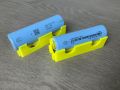 Battery guide - 18650 and 21700 cells.jpg 2,048 × 1,536; 895 KB
-
 Battery guide - 18650 cells in a smart charger.jpg 1,200 × 1,680; 688 KB
-
 Battery guide - 9V NiMH pack opened.jpg 1,225 × 368; 140 KB
-
 Battery guide - AST laptop NiMH pack.jpg 2,200 × 1,237; 349 KB
-
 Battery guide - Atari STBook NiCd pack.jpg 2,200 × 1,650; 345 KB
-
 Battery guide - HP-41CX battery pack.jpg 2,047 × 1,361; 566 KB
-
 Battery guide - laptop battery packs and a bare 18650 cell.jpg 898 × 565; 54 KB
-
 Battery guide - laptop pack internals 18650.jpg 2,084 × 640; 471 KB
-
 Battery guide - lithium ion cell explosion damage.jpg 2,200 × 1,237; 600 KB
-
 Battery guide - NiCd pack with recycling markings.jpg 2,200 × 1,913; 439 KB
-
 Battery guide - NiMH cells.jpg 2,200 × 1,650; 549 KB
-
 Battery guide - spot weld nugget cross section.png 1,257 × 813; 17 KB
-
 Battery guide - Sub-C NiCd cells.jpg 1,007 × 556; 165 KB
-
 Battery guide - swollen failed laptop battery.jpg 2,200 × 1,696; 556 KB
-
 Blown electrolytic capacitor.jpg 800 × 725; 111 KB
-
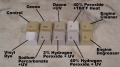 Retrobrite.png 1,377 × 771; 756 KB
-
 SMD capacitor failure.jpg 800 × 800; 170 KB
-
SMD Drag Soldering.mp4 26 s, 360x640; 1.26 MB
-
 SMD Soldering Technique.jpg 992 × 557; 42 KB


