

Amstrad PC2086
 | |
| PC2086 S with colour monitor (Centre for Computing History) | |
| Specifications | |
|---|---|
| Manufacturer | Amstrad plc |
| Type | IBM PC/XT-compatible personal computer |
| Released | 1988 |
| CPU | 8086 at 8 MHz (AMD8086-2), 8087 socket |
| Memory | 640 KB with parity |
| Storage | One or two 720 KB 3.5-inch drives; 30 MB hard disc on the /30 |
| Display | Built-in Paradise VGA (PVGA1A); PC12 and PC14 monochrome and colour monitors |
| Sound | Internal speaker with volume control |
| Ports / interface | Serial, parallel, mouse, VGA, external floppy drive |
| Expansion | Three full-length 8-bit ISA slots and a fourth, half-length, inside the case |
| Power | Internal switch-mode supply with fan |
| Dimensions | 365 × 140 × 395 mm (system unit) |
| OS / Firmware | MS-DOS 3.3, Windows 2.03, GW-BASIC |
| Predecessor | Amstrad PC1640 |
| Model no. | PC2086 S, D, /30 |
The Amstrad PC2086 is the 8086-based model of Amstrad's PC2000 series, which also included the 80286 Amstrad PC2286 and the 80386 Amstrad PC2386. It replaced the Amstrad PC1640: the processor is still an 8 MHz 8086, but the power supply has moved from the monitor into the system unit, the display adaptor is a Paradise VGA chipset, and the drives are 3.5-inch 720 KB units.[1][2]
History
[edit | edit source]The Centre for Computing History dates the PC2086 to 1988 and describes it as an XT-class replacement for the PC1512 and PC1640, launched with the PC2286 and PC2386 for the business market. Wikipedia gives 1989 for the whole series.[3][4] John Elliott records that the hard disc models were fitted with RLL controllers that turned out to be defective, so that many machines had the drive disconnected and a hard card fitted in its place.[1]
The models are the PC2086 S (one floppy drive), D (two floppy drives) and /30 (one floppy drive and a 30 MB hard disc). It shipped with MS-DOS 3.3, Windows 2.03 and GW-BASIC.[2] The PC2000 series monitors are the PC12 MD (12-inch monochrome), PC14 CD (14-inch colour, 0.42 mm dot pitch), PC12 HRCD (12-inch, 0.28 mm) and PC14 HRCD (14-inch, 0.29 mm); unlike those of the PC1512 and PC1640 they carry no supply for the computer.[2][1]
Hardware
[edit | edit source]The main board is CPU PCB MC0065, with a separate RAM expansion board (MC0067), LED board, external floppy connection board (MS0117), keyboard switch board and power supply board (MS0116).[2]
| IC | Part | Function |
|---|---|---|
| IC120 | AMD8086-2 | CPU |
| IC109 | T4750 | Amstrad part 40111 |
| IC112 | Z765APS | Floppy disc controller |
| IC106 | INS8250N | Serial port UART |
| IC134 | MC146818P | Real-time clock and configuration RAM |
| IC118, IC125, IC126 | AMS40040, AMS40039, AMS40127 | Amstrad gate arrays |
| IC129, IC132 | AMS40179-2, AMS40180-2 | Amstrad parts 176061, 176062 |
| IC001–009 | KM41256-15 | Memory module, 9 × 256K |
| IC153–158 | KM41464-15 | Main memory |
| IC160 | PVGA1A (printed "PUGA1A") | Paradise VGA controller |
| IC161–168 | TMS4464-12 | Display memory |
| IC169 | TMSG171P-35 (as printed) | Display (part 176074) |
| IC801 | AMS40178 | Keyboard controller |
The crystals are X101 1.8432 MHz, X103 32.768 kHz, X104 24.00 MHz, X105 28.63636 MHz and X106 16.00 MHz on the main board, X301 28.322 MHz, X302 25.175 MHz and X303 36 MHz for the display, X701 15.00 MHz and X601 6.0 MHz.[2]
Switches and links
[edit | edit source]Eight DIP switches on the back configure the Paradise VGA: SW1 and SW2 tell the BIOS what add-in card is fitted when the built-in VGA is off, SW3 disables the built-in serial port, SW4 disables the built-in VGA, SW5 adjusts the video timing for a multisync monitor, and SW6 enables automatic colour and monochrome switching. John Elliott suggests all switches off except SW6 as a safe setting when the machine will not display.[5] Main board links LK1–LK3 together skip most of the self-test, LK4 sets 640 or 512 KB, LK5 the ROM size and LK6 the write precompensation.[6] There is no BIOS setup screen: floppy drive and display settings are made with DEVICE.COM from the system disc.[7] A slide switch, SW201, selects the drive, and SW102 is the key lock.[2]
Power
[edit | edit source]The supply sits across the middle of the case on its own board, with a switching transformer T601, an STK7356 hybrid regulator (IC601), a 3.15 A time-lag 250 V fuse (F601) and a fan (M601).[2][8] Its outputs are +5 V, +12 V, −5 V and −12 V, set with presets VR604, VR603, VR601 and VR602.[2] The clock and configuration are kept by AA cells in the top half of the case, connected to the main board by a blue and black lead with an in-line connector.[8][4]
Known issues
[edit | edit source]- Hard disc models: defective RLL controllers, often replaced with hard cards.[1]
- Windows 3.0 runs only in monochrome CGA mode with the standard 8086 unless a third-party 8086 VGA driver or an NEC V30 is used.[7][8]
- The keyboard and mouse use Amstrad's own interfaces; DOS Days notes that the keyboard protocol is the PC1640's with a different connector.[9] Owners describe the key lock as a switch that does not lock the case.[10]
Repair guides
[edit | edit source]- Amstrad PC2086 Maintenance Guide – opening the case, supply adjustment, cells, drives, CPU upgrade
- Amstrad PC2086 Troubleshooting Guide – supply, display, keyboard, hard disc and start-up faults
- Amstrad PC2086 Capacitor Replacement Guide – the electrolytics in the supply and on the main board
Documentation
[edit | edit source]- Amstrad PC 2086 Service Manual – Amstrad's service manual for the PC2086 and the PC12 and PC14 monitors
Gallery
[edit | edit source]-
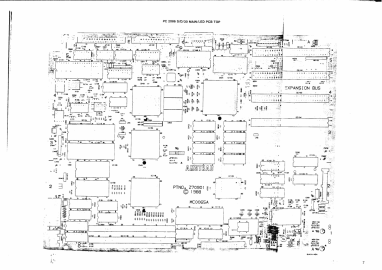 Main board MC0065 (service manual p. 7)

Related pages
[edit | edit source]- Amstrad PC1640 · Amstrad PC2286 · Amstrad PC2386
- Battery Explosion, Capacitor or Corrosion Damage · Hard Drive Maintenance and Repair
References
[edit | edit source]- ↑ 1.0 1.1 1.2 1.3 John Elliott, "Amstrad XTs: Models", seasip.info, 19 April 2013. Retrieved 2026-10-02. The PC2086 of 1988 as an updated PC1640: supply moved into the computer, Paradise VGA, three 3.5-inch bays, the sunroof secured by a screw, the defective RLL controllers of hard disc models, four slots (one hidden), AA-cell clock backup, MS-DOS 3.3 and Windows 2.1.
- ↑ 2.0 2.1 2.2 2.3 2.4 2.5 2.6 2.7 Amstrad plc, PC2086 S/D/30 Personal Computer / PC12 MD / PC12 HRCD / PC14 CD / PC14 HRCD Monitors Service Manual. Hosted as File:Amstrad PC 2086 Service Manual.pdf, described at Amstrad PC 2086 Service Manual. Technical specification and safety tests p. 2; alignment instructions and notes to engineers p. 3; electrical parts list p. 4; main PCB top view p. 7; power supply schematic p. 18.
- ↑ Centre for Computing History, "Amstrad PC2086 S", exhibit CH16138. Retrieved 2026-10-02. The PC2086 as a 1988 XT replacement for the PC1512 and PC1640, its specification, the external drive options and the bundled software.
- ↑ 4.0 4.1 Wikipedia, "Amstrad PC2286" (revision 1353136875). Retrieved 2026-10-02. The PC2000 series of PC2086, PC2286 and PC2386, launched 1989, with the supply in the base unit, AA cells on top of the base unit, 3.5-inch drives with a side port for an external 5.25-inch drive, and the range of 12- and 14-inch monitors.
- ↑ John Elliott, "PC2086 DIP switches", seasip.info, 3 July 2004. Retrieved 2026-10-02. SW1–SW8 functions and the safe setting.
- ↑ John Elliott, "PC2086 option links", seasip.info, 14 May 2004. Retrieved 2026-10-02. LK1–LK6, interpreted from the service manual.
- ↑ 7.0 7.1 John Elliott, "Amstrad XTs: Questions and answers", seasip.info, 26 June 2019. Retrieved 2026-10-02. DEVICE.COM in place of a setup screen on the PC2086, Windows 2 supplied with the PC2086, the V30 needed for Windows 3.0 colour drivers.
- ↑ 8.0 8.1 8.2 John Elliott, "Replacing the PC2086 processor", seasip.info, 23 February 2013. Retrieved 2026-10-02. Opening the case, the battery lead connector between the case halves, removing the supply (four screws, power switch pressed in), the CPU location, fitting a V30.
- ↑ DOS Days, "The Amstrad PC1640 Project – Part 1", 17 August 2026. Retrieved 2026-10-02. The PC1640 keyboard protocol shared with the PC2086 and PC3086, with a different connector.
- ↑ cwathen and kuro68k, "PC2086 advice", Vintage Computer Federation Forums, August 2019. Retrieved 2026-10-02. Community comments: the PC2086 key lock fault, disconnecting the lock, the proprietary keyboard and mouse interface, the hard disc on an ISA controller.