

Acorn Universal Second Processor Unit
| Acorn Universal Second Processor Unit | |
|---|---|
 |
|
| The Universal Second Processor Unit (photo: Chris Whytehead, CC BY-SA 3.0) | |
| Manufacturer | Acorn Computers |
| Type | External Tube housing for a BBC Master Series co-processor |
| Release date | 1987 |
| Price | £86.25 including VAT[1] |
| Interface | Tube (40-way ribbon cable) |
| Compatible | BBC Micro Model B, BBC Micro Model B+; BBC Master 128 as an external co-processor |
| Model | ANC21 |
| Power | Built-in mains supply, 220/240 V 50-60 Hz |
The Acorn Universal Second Processor Unit is a second processor case with its own power supply and a motherboard that takes one of Acorn's internal co-processor boards for the BBC Master Series. Plugged into the Tube socket of a BBC Micro Model B or B+, it lets those machines use the Master's 65C102 "Turbo" or 80186 "512" co-processor.[1] Chris Whytehead notes that it also lets a Master 128 use such a board as an external co-processor.[2] Acorn's sales code for it was ANC21, and its 1987 leaflet priced it at £86.25 including VAT.[1]
The unit itself contains no processor or memory. The co-processor board, bought separately, carries the processor, the RAM, the boot ROM and its own Tube chip.[1][3]
Hardware
[edit | edit source]
Acorn's specification lists three parts: a motherboard with connections for the co-processor, a built-in power supply for 220/240 V at 50 to 60 Hz, and a cable to the Tube socket. Two rows of sockets on the motherboard take the co-processor board.[1] The case is the cream "cheese wedge" second processor case also used by the Acorn 6502 Second Processor and Acorn Z80 Second Processor; the mains lead and power switch are on the back panel.[2]
The two co-processors available when the unit was launched were:[1]
| Co-processor | Processor and memory | Host requirements |
|---|---|---|
| Turbo (ADC06) | 65C102 at twice the speed of the standard processor; HiBASIC | DNFS, or a 1770 upgrade with 1770 DFS or ADFS |
| 512 (ADC08) | 10 MHz 80186 with 512 KB of RAM; runs MS-DOS and CP/M-86 software, supplied with GEM | A 1770 upgrade with ADFS, and a dual 80-track disc drive |
Acorn's leaflet warns that some MS-DOS software may not work with the 512 on a BBC Micro because it needs a numeric keypad.[1] The Turbo board is described on Acorn Master Turbo. Chris Whytehead gives the 65C102 board's clock as 4 MHz.[4]
Fitting and compatibility
[edit | edit source]- Check the host's filing system ROMs against the table above. Acorn notes that Model B owners may need to replace their standard disc filing system with one or more of the upgrades it sold: the DNFS ROM upgrade (ANB21, £20.61), the 1770 upgrade (ANB28, £49.95) and the ADFS ROM (ANB29, £29.99).[1]
- With the unit unplugged, remove the lid and fit the co-processor board onto the two rows of sockets on the motherboard.[1] On the Master, the 65C102 board's plugs PL1 and PL2 go into sockets SK1 and SK2 and the board sits on support posts; check that every pin enters its socket.[3]
- With both machines switched off, plug the ribbon cable into the Tube socket under the BBC Micro.[1]
- Switch on and press BREAK. The start-up banner should name the co-processor; the 65C102 user guide lists the messages to expect.[3]
- On a BBC Master 128, an external Tube device is only used after
*CONFIGURE EXTUBE. Use*CONFIGURE INTUBEto go back to a co-processor fitted inside the Master.[3]
Fault finding
[edit | edit source]Acorn published no service manual for the unit. Its BBC Master Series Service Manual gives these checks for an internal co-processor, and they apply to the same boards in the Universal unit:[5]
| Symptom | Checks |
|---|---|
| Co-processor not recognised; the host's own start-up banner appears | Configuration (on a Master); the two connectors correctly mated; all connections to the two connectors[5] |
| Recognised, but only a cursor in the top left corner of the screen | Try the co-processor in another computer; check the two connectors are mated; check the boot ROM or ROMs are correctly inserted in the co-processor[5] |
Check the ribbon cable and the Tube socket as well. On the Tube connector, pins 31 to 39 carry +5 V from the host and the odd-numbered pins 1 to 29 are 0 V.[5] Owners of the 6502 Second Processor, which uses the same kind of cable, have cured "not seen" faults by fitting a new ribbon cable and by cleaning a tarnished Tube connector.[6]
Warning: the transformer and the power supply inside the case are connected to the mains. Unplug the unit before removing the lid.
Documentation
[edit | edit source]- File:Acorn Universal Second Processor leaflet (APP111).pdf: Acorn's 1987 leaflet, with the specification, requirements and prices.
- Acorn 65C102 Co-Processor User Guide for fitting and configuring the Turbo board.
- BBC Master Series Service Manual for co-processor fault finding.
No circuit diagram or parts list for the Universal unit's motherboard or power supply has been found on Chris's Acorns or archive.org.
Gallery
[edit | edit source]-
 The motherboard with no co-processor fitted
 -
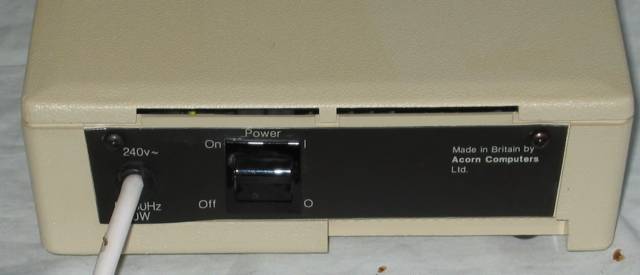 Rear panel, with the mains lead and power switch


Related pages
[edit | edit source]References
[edit | edit source]- ↑ 1.00 1.01 1.02 1.03 1.04 1.05 1.06 1.07 1.08 1.09 Acorn Computers, More power for your BBC Microcomputer!, leaflet APP111, 1987. Hosted on this wiki: File:Acorn Universal Second Processor leaflet (APP111).pdf. Purpose, description, technical specification, requirements for each co-processor, prices including VAT and product codes (ANC21, ANB21, ANB28, ANB29).
- ↑ 2.0 2.1 Whytehead, Chris. "Acorn ANC21 Universal 2nd Processor Unit", Chris's Acorns, The Centre for Computing History (retrieved 2026-10-02). Serial number 03-ANC21-1000861; photographs open with and without an ADC06 65C102 co-processor; use with a BBC Micro or as an external co-processor with a BBC Master 128.
- ↑ 3.0 3.1 3.2 3.3 Acorn Computers, 65C102 co-processor user guide, part no. 0443,030, issue 2, April 1986. Hosted on this wiki: Acorn 65C102 Co-Processor User Guide. Fitting PL1 to SK1 and PL2 to SK2 (pp. 5 to 6); *CONFIGURE TUBE, NOTUBE, INTUBE and EXTUBE (p. 9).
- ↑ Whytehead, Chris. "Acorn ADC06 65C102 Co-processor" and "Acorn ADC08 Intel 80186 CoProcessor", Chris's Acorns (retrieved 2026-10-02). 65SC102 at 4 MHz; the ADC08 board with an Intel 80186 and 512K RAM, sold with the Master 128 as the Master 512 and running DOS+ and GEM.
- ↑ 5.0 5.1 5.2 5.3 Acorn Computers, British Broadcasting Corporation Master Series Microcomputer Service Manual, part no. 0443,004, issue 1, April 1986. Hosted on this wiki: BBC Master Series Service Manual. Section 7.12 the Tube; section 7.13 internal co-processor; appendix, PL6 Tube connector pinout (40-way IDC; +5 V on pins 31 to 39, 0 V on odd pins 1 to 29).
- ↑ "6502 Second Processor not seen", stardot.org.uk forum thread, May 2018. Elminster fixed similar faults with a new cable and by cleaning a tarnished Tube connector; hoglet diagnosed a data line reading back as zero with a short BASIC program reading the Tube registers.