

Amstrad PC1640
 | |
| PC1640 HD20 with a colour monitor | |
| Specifications | |
|---|---|
| Manufacturer | Amstrad plc |
| Type | IBM PC-compatible personal computer |
| Released | 1987 |
| CPU | Intel 8086 at 8 MHz (MBL8086-2P) |
| Memory | 640 KB |
| Storage | One or two 360 KB 5.25-inch drives, or one drive and a 20 MB hard disc (30 and 40 MB later) |
| Display | Internal graphics adaptor based on the Paradise PEGA1A (EGA, CGA, Plantronics, MDA and Hercules modes); PC-MD, PC-CD or PC-ECD monitor |
| Sound | Internal speaker with volume control |
| Ports / interface | RS-232 serial, parallel, mouse, light pen and joystick, keyboard (with joystick port on the keyboard) |
| Expansion | Three 8-bit ISA slots under the rear cover and a fourth inside the case |
| Power | Supplied by the monitor through a 14-way DIN cable |
| Dimensions | 370 × 135 × 384 mm (system unit, W × H × D) |
| Weight | 5.0 kg (SD), 5.8 kg (DD), 6.0 kg (HD) system unit |
| OS / Firmware | MS-DOS 3.2, GEM |
| Predecessor | Amstrad PC1512 |
| Successor | Amstrad PC2086 |
| Model no. | PC1640 SD, DD, HD20, HD30, HD40 |
The Amstrad PC1640 is the successor to the Amstrad PC1512, introduced in 1987. It keeps the PC1512's case, 8 MHz 8086 and supply-in-the-monitor design, has 640 KB of RAM as standard, and replaces the PC1512's CGA circuit with an EGA-compatible internal graphics adaptor built around the Paradise PEGA1A. It was sold with one of three monitors: the PC-MD Monochrome Display, the PC-CD Colour Display and the PC-ECD Enhanced Colour Display.[1][2]
History
[edit | edit source]DOS Days dates the PC1640 to June 1987, and Wikipedia to "later in 1987".[3][4] DOS Days lists UK prices from £460 for an SD with the monochrome monitor to £1,099 for an HD40 with the ECD.[3] In the United States it was sold as the PC6400, with a 20 MB hard disc.[4] Schneider sold it in Germany as the Schneider PC 1640.[5] It came with MS-DOS 3.2, the GEM desktop and Locomotive BASIC 2.[2]
The main board went through minor revisions, MC0040 first and MC0042 from mid-1988; DOS Days has a late MC0042D board with BIOS version 3.1, made no earlier than week 40 of 1988, shortly before production moved to the PC2000 series.[6][7] Amstrad's parts list gives the CPU board as MC0040A.[1]
Hardware
[edit | edit source]| IC | Part | Function |
|---|---|---|
| IC119 | MBL8086-2P | CPU |
| IC130 | µPD8237AC-5 | DMA controller |
| IC109 | MBL8259A-2P | Interrupt controller |
| IC114 | µPD8253C-2 | Interval timer |
| IC112 | Z765APS | Floppy disc controller |
| IC111 | FDC91C36 | Floppy data separator |
| IC106 | INS8250N | Serial port UART |
| IC134 | MC146818P | Real-time clock and NVR |
| IC135–152 | MN41256-15 | Main memory, 18 × 256K |
| IC153–158 | TMS4464-12 (153, 154, 156, 157), MT4264-15 (155, 158) | Main memory above 512K |
| IC901–908 | TMS4464-12 | Display memory |
| IC910 | PEGA1A | Paradise EGA controller |
| IC118, 125, 126 | AMS40040, AMS40039, AMS40041 | Amstrad gate arrays |
| IC129, IC132 | AMSTRAD 40043, 40044 | System ROMs |
| IC801 | AMSTRAD 40042 | Keyboard controller (keyboard PCB MK0002A) |
The list prints IC125 twice, once with IC118 as an AMS40040 and once alone as an AMS40039; on the PC1512 IC125 is the AMS40039.[1][8] DOS Days describes the three Amstrad devices as Toshiba gate arrays for the bus (40039), memory (40040) and peripheral glue logic (40041), and the main memory as two banks of 41256 DRAMs with parity.[6] The crystals are X101 1.8432 MHz, X103 32.768 kHz, X104 24.0 MHz, X105 28.636 MHz and X901 16.257 MHz for the display, plus a 6.0 MHz ceramic resonator in the keyboard.[1] The CPU runs at 8 MHz and the 8-bit expansion bus at 4 MHz; DOS Days measured 4 MHz at the slot's clock pin.[9][10]
Display and switches
[edit | edit source]The internal graphics adaptor (IGA) gives 640 × 350 graphics in 16 of 64 colours on the PC-ECD, CGA and 200-line EGA modes on the PC-CD, and 80-column text with 9 × 14 characters on the PC-MD.[1] A bank of ten DIP switches on the back of the system unit sets the starting mode for the monitor in use, the font, the monitor type and the ROM size; switch 10 disables the IGA so that a separate display card can be used.[1][11] The video socket is a 9-way D type; switch 8 grounds pin 2 or routes the secondary red signal to it, depending on the monitor.[9] The ECD monitor has its own cooling fan.[4][3]
| Monitor | Type | Mains fuse | Presets for the computer's rails |
|---|---|---|---|
| PC-MD | Monochrome | F501, 3.15 A time-lag | VR501, VR502, VR504, VR505, VR507 |
| PC-CD | Colour, 0.42 mm dot pitch | F501, 3.15 A time-lag | VR601–VR604, VR606 |
| PC-ECD | Colour (EGA), 0.31 mm dot pitch | F501, 3.15 A | VR601–VR604, VR606 |
Power
[edit | edit source]As on the PC1512, the supply is in the monitor and feeds the system unit through a 14-way DIN cable with the same pinout: +5 V on pins 3 and 5, +12 V on pin 11, −12 V on pin 9, −5 V on pin 13.[9] Each monitor's alignment sets the computer's rails to the same targets as the PC1512's.[1] Four non-rechargeable AA cells keep the clock and configuration memory alive.[9] The PC1640's monitors use a 9-way D video plug and separate syncs, and do not plug into a PC1512 without rewiring.[12] DOS Days used a PC-ECD with another computer's EGA-capable card with the 14-way cable unplugged, and found that it runs without the computer connected.[10]
Diagnostics
[edit | edit source]Amstrad's service tool for the PC1640 was the RP5-2 diagnostics card, which replaced the PC1512's RP4. It plugs into an expansion slot with an IC clip over IC108 and loop-back plugs on the serial and parallel ports; the display tests run from a disc supplied with it, documented in the Amstrad PC1640 VDU Tests Manual.[1]
Repair guides
[edit | edit source]- Amstrad PC1640 Maintenance Guide – DIP switches, cells, drives, supply adjustment for the three monitors
- Amstrad PC1640 Troubleshooting Guide – self-test, floppy controller error, monitor and memory faults
- Amstrad PC1640 Capacitor Replacement Guide – electrolytic lists for the PC-MD, PC-CD and PC-ECD
The Amstrad PC1512 Maintenance Guide covers the shared case, the cell tray and the floppy drives in more detail.
Documentation
[edit | edit source]- Amstrad PC1640 Service Manual – Amstrad's service manual for the PC1640 and its three monitors
- Amstrad PC1640 VDU Tests Manual – the RP5-2 display test disc
- PC1640 Technical Reference Manual, transcribed by John Elliott at seasip.info
- Amstrad PC 1640 User Manual, scanned on archive.org
Gallery
[edit | edit source]-
 PC1640 HD20 on display in Almería, 2014
 -
 CPU board, top view (service manual p. 28)
 -
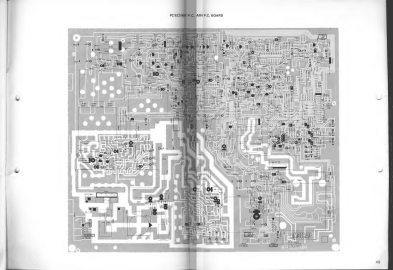 PC-ECD main board, which carries the supply (service manual p. 49)


Related pages
[edit | edit source]- Amstrad PC1512 · Amstrad PC2086
- Battery Explosion, Capacitor or Corrosion Damage · Floppy Drive Repair · CRT Discharge Procedure
References
[edit | edit source]- ↑ 1.0 1.1 1.2 1.3 1.4 1.5 1.6 1.7 Amstrad plc, PC1640 Personal Computer, PC-MD Monochrome Display, PC-CD Colour Display, PC-ECD Enhanced Colour Display Service Manual. Hosted as File:Amstrad PC1640 Service Manual.pdf, described at Amstrad PC1640 Service Manual. Specification, dimensions and safety tests p. 2; servicing note p. 3; switch settings p. 19; bad sectors and the RP5-2 card p. 20; electrical parts list p. 26; monitor parts lists pp. 35, 40–41 and 46.
- ↑ 2.0 2.1 John Elliott, "Amstrad XTs: Models", seasip.info, 19 April 2013. Retrieved 2026-10-02. The PC1640 as a PC1512 derivative with an EGA chipset similar to a Paradise EGA card, 640K standard, four ISA slots (one hidden), the supply in the monitor, the PC6400 name, the bundled software.
- ↑ 3.0 3.1 3.2 DOS Days, "Amstrad PC1512 and PC1640". Retrieved 2026-10-02. The PC1640's June 1987 launch, UK prices of each variant with each monitor, the PEGA1A and its 256 KB of video memory, the fan in the ECD monitor, the AA cell tray, the 14-pin DIN pinout.
- ↑ 4.0 4.1 4.2 Wikipedia, "Amstrad PC1512" (revision 1358914862). Retrieved 2026-10-02. The PC1640 of 1987 with 640 KB and the Paradise EGA chipset, sold in the US as the PC6400 with a 20 MB hard drive, the fan in the ECD monitor, the V30 and 8087 upgrades.
- ↑ Wobblestone, "Amstrad 1640 (germany: Schneider PC 1640) with battery damage, works 'a little', has address problems", Vintage Computer Federation Forums, November–December 2024. Retrieved 2026-10-02. Community repair report on a Schneider PC 1640: leaking AA cells, corroded CPU and 8087 sockets, a dead CPU, address faults traced with Ruud's Diagnostic ROM.
- ↑ 6.0 6.1 DOS Days, "The Amstrad PC1640 Project – Part 1", 17 August 2026. Retrieved 2026-10-02. Main board revisions MC0040x and MC0042x, the Toshiba gate arrays 40039T, 40040T and 40041T, the PEGA1A internal graphics adaptor, the DIP switches, memory organisation, drive select jumpers, the non-standard keyboard and mouse.
- ↑ DOS Days, "The Amstrad PC1640 Project – Part 2", 18 August 2026. Retrieved 2026-10-02. The MC0042D replacement board with V3.1 BIOS, memory parity errors on the original board, the Gotek and XT-CF-Lite, the floppy controller's lack of high-density support.
- ↑ Amstrad plc, PC1512 Personal Computer, PC-MM Monochrome Monitor, PC-CM Colour Monitor Service Manual. Hosted as File:Amstrad PC1512 Service Manual.pdf, described at Amstrad PC1512 Service Manual. CPU unit electrical parts list p. 19.
- ↑ 9.0 9.1 9.2 9.3 Amstrad, PC1640 Technical Reference Manual, section 1, transcribed by John Elliott: seasip.info. Retrieved 2026-10-02. Section 1.1 (8086-2 at 8 MHz, 4 MHz peripheral bus, 8087 socket), 1.9 (clock and four AA cells), 1.20 (9-way video connector and switch 8), 1.21 (14-way power connector) and 1.22 (display switch settings).
- ↑ 10.0 10.1 DOS Days, "The Amstrad PC1640 Project – Part 3", 20 August 2026. Retrieved 2026-10-02. The V30 upgrade and its benchmark results, the crystals measured with an oscilloscope (24 MHz CPU clock, 1.8432 MHz, 16.25 MHz dot clock), 4 MHz at slot pin B20, using the PC-ECD with another computer.
- ↑ John Elliott, "PC1640 DIP switches", seasip.info, 12 April 2003. Retrieved 2026-10-02. SW1–SW5 hardware emulation and initial mode, SW6–SW7 font, SW8 monitor type, SW9 32K EGA ROM, SW10 disabling the internal adaptor and selecting the add-on card type.
- ↑ VintageVic and others, "Amstrad 1640 and PC-MM monitor – can they be made to work together?", Vintage Computer Federation Forums, February–March 2025. Retrieved 2026-10-02. Community discussion: PC-MM (8-pin DIN, composite sync) against PC1640 monitors (9-way D, separate syncs).