

IBM 3270 PC
 | |
| IBM 3270 PC with the 122-key keyboard and 5272 Color Display | |
| Specifications | |
|---|---|
| Manufacturer | IBM |
| Type | Personal computer and 3270 display station |
| Released | Announced 18 October 1983; general availability first quarter 1984[1] |
| Intro price | US$3,785 (Model 2) to US$6,210 (Model 6), system unit only[2] |
| CPU | Intel 8088 at 4.77 MHz (IBM PC XT system board)[3] |
| Memory | 256 KB or 640 KB on the system board, depending on model; up to 640 KB conventional memory, plus 1 MB on the Expanded Memory Adapter in Models 31, 51 and 71[4] |
| Storage | One or two 360 KB 5.25-inch diskette drives; 10 MB fixed disk on Models 6 and 26, 20 MB on Models 70 and 71[4] |
| Display | IBM 5272 Color Display (14-inch, 720 × 350), IBM 5151 Monochrome Display, or IBM 3295 Plasma Monitor (Models 24 and 26) |
| Sound | PC speaker |
| Dimensions | 5.5 × 20 × 16 in[2] |
| Weight | 33 lb (15 kg)[2] |
| OS / Firmware | 3270 PC Control Program with PC DOS 2.0 or later |
| Model no. | 5271 Models 2, 4, 6, 24, 26, 30, 31, 50, 51, 70, 71, P30, P31, P50, P51, P70, P71 |
The IBM 3270 PC (machine type 5271) is a personal computer that IBM announced on 18 October 1983 as a combined IBM PC and 3270 display station.[1] It attaches by coaxial cable to an IBM 3274 control unit and, with the 3270 PC Control Program, runs up to four host sessions, two notepads and one PC DOS session at the same time.[1] The system unit is an IBM PC XT (5160). IBM's parts catalogue states that all base system parts for the 3270 XT products are the same as 5160 XT base system parts,[4] and IBM's own support bulletin names only one hardware difference in the XT-based units: a power supply with a very quiet fan (P/N 6323357, FRU 6347754).[5] The 3270 functions come from a set of adapter cards, a 122-key keyboard and a 14-inch colour display.
History
IBM announced the 3270 PC with three models. Model 2 had 256 KB, one diskette drive, the display adapter, keyboard adapter and 3270 system adapter. Model 4 added a second diskette drive, a 64/256 KB memory expansion option fitted with 64 KB (320 KB in total) and a printer adapter. Model 6 had the Model 4 memory and printer adapter with a 10 MB fixed disk in place of the second diskette drive.[1] BYTE listed the system units at US$3,785, US$4,650 and US$6,210, with the 5272 Color Display at US$995, the All Points Addressable graphics adapter at US$550, the Control Program at US$300 and the File Transfer Program at US$600.[2]
Later models moved to 640 KB system boards and half-height diskette drives, and added Models 24 and 26 for the IBM 3295 Plasma Monitor.[4] Models 31, 51 and 71 came with the Expanded Memory Adapter (XMA), which IBM announced in 1986, and need Control Program 3.0.[5][4] A short version of the coaxial adapter replaced the long card in spring 1986.[5]
The same adapter set was used in the rest of the family: the IBM 3270 PC/G and IBM 3270 PC/GX (both on the 5371 system unit, with different display attachment units and displays), the 3270 PC AT (5273) and the 3270 PC AT/G and AT/GX (5373).[4] In 1987 IBM released the 3270 Workstation Program, which gave a standard PC XT or PC AT with a 3278/79 Emulation Adapter the multi-session function of the Control Program.[6]
Models
IBM's model list from chapter 10 of the Service Information Manual. Memory is split between the system board and adapter cards, and the 1989 list describes Models 4 and 6 with a 128 KB Printer/Memory Adapter where the 1983 announcement gives a 64 KB memory expansion option and a separate printer adapter.[4][1]
| Model | System board RAM | Display adapter | Diskette | Fixed disk | Other |
|---|---|---|---|---|---|
| 002 | 256 KB | 5151/5272 | 1 × 360 KB | None | 5271 keyboard and keyboard adapter; 3270 Systems Adapter (DFCA) |
| 004 | 256 KB | 5151/5272 | 2 × 360 KB | None | Printer/Memory Adapter with 128 KB |
| 006 | 256 KB | 5151/5272 | 1 × 360 KB | 10 MB | Printer/Memory Adapter with 128 KB |
| 024 | 256 KB | 3295 Plasma Display Adapter | 2 × 360 KB | None | Plasma Keyboard Adapter; Printer/Memory Adapter with 128 KB |
| 026 | 256 KB | 3295 Plasma Display Adapter | 1 × 360 KB | 10 MB | Plasma Keyboard Adapter; Printer/Memory Adapter with 128 KB |
| 030 | 640 KB | 5151/5272 | 1 × 360 KB half-high | None | Printer Adapter |
| 050 | 640 KB | 5151/5272 | 2 × 360 KB half-high | None | Printer Adapter |
| 070 | 640 KB | 5151/5272 | 1 × 360 KB half-high | 20 MB | Printer Adapter |
| 031 | 256 KB | 5151/5272 | 1 × 360 KB half-high | None | XMA with 1 MB (includes a printer adapter); Control Program 3.0 |
| 051 | 256 KB | 5151/5272 | 2 × 360 KB half-high | None | XMA with 1 MB; Printer/Memory Adapter with 128 KB; Control Program 3.0 |
| 071 | 256 KB | 5151/5272 | 1 × 360 KB half-high | 20 MB | XMA with 1 MB; Control Program 3.0 |
| P30, P31, P50, P51, P70, P71 | As the numeric model of the same number, with the Enhanced (101-key) Keyboard and a cable adapter in place of the 5271 keyboard; Control Program 3.0 required | ||||
Only Models 6, 26, 70 and 71 have a fixed disk. Models 24 and 26 use a Plasma Keyboard Adapter with the 3295 Plasma Display Adapter, not the standard keyboard adapter.[4]
System unit
The 5271 is built on the PC XT system board, power supply, drives and covers.[4] It has six long and two short expansion slots. The announcement letter gives the slot allocation for the first three models:[1]
| Slot | Adapter | Models |
|---|---|---|
| 1 | 3270 System Adapter (DFCA) | 2, 4, 6 |
| 2 | 64/256 KB memory expansion | 4, 6 |
| 3 | Free | |
| 4 | Display adapter | 2, 4, 6 |
| 5 | Fixed disk adapter | 6 |
| 6 | Diskette drive adapter | 2, 4, 6 |
| 7 (short) | Printer adapter | 4, 6 |
| 8 (short) | Keyboard adapter | 2, 4, 6 |
Any of the long 3270 cards can go in any long slot, but the All Points Addressable and Programmed Symbols adapters must sit either side of the display adapter, because the three are joined by top-edge connectors. All the 3270-specific adapters use interrupt level 2.[5] The display adapter uses memory segment A for its screen buffer, so the 704 KB configurations possible on a standard PC do not work on a 3270 PC.[5]
Keyboard adapter
The keyboard adapter converts the 3270 keyboard's scan codes into PC XT scan codes and passes them to the system board keyboard socket through the keyboard adapter cable. Its ROM also holds the BIOS extension for the display adapter, so the display adapter does not work without it.[7] IBM used three versions:[5]
- The original adapter, on units built before 25 October 1984. Enter and the black arrow keys work only while the Control Program is loaded.
- A revised adapter with an NMI switch and a 9-pin serial port on the bracket, fitted to XT-based units from October 1984 to early 1986 and to all AT-based units. The serial port is at I/O 1B8h-1B9h and carries −12 V (pin 1), +5 V (pin 3) and +12 V (pin 9) as well as data.
- A later adapter without the NMI switch or serial port, fitted to XT-based units from early 1986.
The keyboard adapter cable plugs into the lower connector of slot 8 and into the round keyboard socket on the system board; its light grey end takes the keyboard cable.[8] The cable contains no electronics.[7] IBM's continuity chart in the Maintenance Information gives its wiring (p. 3-300-15), reproduced in the maintenance guide.[9] A standard PC XT keyboard works on the system board socket but gives POST error 302.[7]
Display adapter and graphics options
The display adapter is a full-length card with 8 KB of memory: 4 KB for the 3270 screen and 4 KB for an emulated CGA or MDA screen. It uses a Signetics SCN2672 video controller at I/O 0180h-0181h, with its other registers up to 019Bh.[7] Two optional cards connect to it by top-edge connectors:[7][5]
- The All Points Addressable (APA) adapter adds the CGA graphics modes (320 × 200 in four colours and 640 × 200 in two) and a 720 × 350 two-colour mode.
- The Programmed Symbols adapter holds up to seven loadable character sets for host graphics. Sets 4, 5 and 7 are stored as three colour planes. With it fitted, the 3270 PC appears to GDDM as a 3279.
The emulation has limits. There is no border colour, no 40-column text mode, no high intensity and no light pen connector, and standard PC display adapters do not work in the 3270 PC.[5]
Distributed Function Communications Adapter
IBM's service documents call the coaxial adapter the Distributed Function Communications Adapter (DFCA).[4] The original long card is the same 3278/79 Emulation Adapter that IBM sold for the standard PC. It has a BNC coaxial connector, uses interrupt level 2 and has its registers at I/O 2D0h-2D6h.[5][10] The short replacement card of 1986 adds a register at 2D7h and switch-selectable addresses.[7] The 3270 PC can attach to a 3274 directly or through a 3299 multiplexer, and runs in Control Unit Terminal (CUT) mode as a 3278 Model 2 or in Distributed Function Terminal (DFT) mode with up to four host sessions.[5][1]
Memory
Feature 4505 is a short Printer/Memory Adapter with a parallel port and 128 KB. A 256 KB piggyback card (feature 4500) plugs onto it and brings the system to 640 KB without using a long slot.[5] The Expanded Memory Adapter (XMA, P/N 4466857, with piggyback memory P/N 4466858) carries 1 MB and a printer port and takes a second 1 MB on a piggyback card. The Control Program 3.0 uses it to hold up to six PC sessions in separate banks. It is not compatible with the Lotus/Intel/Microsoft expanded memory specification.[5][4] IBM does not support the XMA jumpered as LPT2 in a 5271 with a fixed disk, because of an interrupt level conflict.[4] The printer adapter supplied with the XT-based system unit can only be LPT1.[5]
Display
The IBM 5272 Color Display is a 14-inch monitor on a swivel stand.[2][9] It shows 720 × 350 in seven colours plus black, with no high-intensity colours.[7][5] IBM gives its signal frequencies as 21.676 MHz video, 23.612 kHz horizontal and 62.967 Hz vertical, all ±0.02 %, with negative-going sync on a 9-pin connector.[5] The 5151 Monochrome Display also works, and the display adapter detects which is fitted. Only one display can be attached at a time, and no other PC monitor works.[5][7]
| Pin | Function |
|---|---|
| 1 | Shield, cable (bypass ground) |
| 2 | Shield, video red, blue, green |
| 3 | Reserved |
| 4 | Signal ground (tied to pin 2) |
| 5 | Video, green |
| 6 | Video, blue |
| 7 | Video, red |
| 8 | Horizontal drive |
| 9 | Vertical drive |
Models 24 and 26 use the IBM 3295 Plasma Monitor instead, which supports host screens up to 62 rows by 160 columns. An existing 3270 PC can be converted if it has the revised keyboard adapter (P/N 2682827, the one with the NMI switch) and the 3295 display adapter (P/N 2683124); only Control Program 1.2.2 supports the 3295.[5]
Keyboard
The 3270 PC keyboard is a 122-key Model F keyboard with 24 program function keys and an 18-key numeric pad. Keys for 3270 functions are marked in black and keys for PC functions in blue.[11][9] It weighs 4.2 kg (9.3 lb).[11] The Maintenance Information parts list gives 6110344 as the US and Canada keyboard assembly, with separate part numbers for the UK, French, Spanish, Italian and German versions (UK: 1445095).[9] The 1989 Service Information Manual gives 1389098 (Converged Keyboard) as the replacement for both the metal-bottom and plastic-bottom keyboards.[4]
The keyboard uses the AT keyboard protocol and scan code set 3 on a 5-pin DIN plug with 240-degree pin spacing; the keyboard adapter translates its codes for the XT system board.[12] The P models use the 101-key Enhanced Keyboard and a cable adapter instead.[4]

Software
The 3270 PC Control Program runs with PC DOS 2.0 or later and provides up to seven concurrent sessions: four host sessions, two notepads and one PC DOS session, each shown in a window that the user can size and move.[1][13] Without it, the machine works only as an IBM PC.[13] The announcement letter gives the Control Program's own storage as 94,116 bytes in CUT mode, 145,828 bytes in non-SNA DFT mode and 156,708 bytes in SNA DFT mode, plus 1,968 to 6,966 bytes for each host session, 3,840 bytes per notepad and 24,000 bytes for PC DOS.[1] The SEND and RECEIVE commands transfer files between the PC DOS session and VM/CMS or MVS/TSO on the host, with the File Transfer licensed programs installed on the host.[1][13]
Control Program 3.0 is required for Models 31, 51 and 71 and all P models.[4] From 1987 the 3270 Workstation Program replaced it.[6]
Error codes
The 3270 PC uses error code ranges that a standard PC XT does not. IBM's table maps each range to the field-replaceable unit:[4]
| Code | FRU indicated |
|---|---|
| 28xx | DFCA card (3278/79 Emulation Adapter) |
| 32xx | Display Adapter, Programmed Symbols Adapter, All Points Addressable Adapter, Extended Graphics Adapter (3270 PC AT only) or top card connector |
| 44xx | Display attachment unit: 5278 with 5279, or 5378 with 5379; on AT-based PC/G and GX also the Display/Mouse/Tablet Adapter and EMA memory card; on XT-based PC/G and GX also the display adapter |
| 45xx | IEEE-488 Interface Adapter |
On the 5271, 3201 points to the display adapter, 3202 to the Programmed Symbols adapter and 3203 to the All Points Addressable adapter, and 2801 means the host connect card failed to initialise.[7] A 2801 can be false: if a long DFCA has been replaced with the short card, the keyboard/timer adapter may need updating. If the host session comes up normally after pressing F1, the 2801 was false, and IBM's ECA001 supplies a replacement EPROM (P/N 1497249) for the keyboard/timer adapter.[4] The XMA diagnostic tests the D000-DFFF address range, so any other adapter with RAM or ROM there causes a false 8505.[4]
The coaxial connection test ends with a resistance check. With the system unit off and the coaxial cable removed, the resistance between the centre pin and the shell of the adapter's BNC connector should be less than 1 ohm; if it is not, IBM says to replace the DFCA.[9] IBM warns against connecting or disconnecting the coaxial cable during an electrical storm.[9]
Known faults
The system board, power supply and drives are PC XT parts, so the PC XT faults apply.[4]
- Shorted tantalum capacitors on the system board pull the +5 V rail down. Thirteen of the sixteen tantalums on the 5160 system board are on the +5 V line, and minuszerodegrees.net observes that they tend to fail at power-on or within about 30 seconds.[14]
- Line suppression capacitors in the power supply can rupture with smoke and a strong smell.[14]
- Models 6, 26, 70 and 71 have fixed disks. IBM advised parking the heads with SHUTDOWN or SHIPDISK from the diagnostics diskette before switching off, and never moving a fixed-disk 3270 PC while it is on.[5]
- The keyboard adapter cable can be missing. seasip.info's machine arrived without one, and its author worked out the pinout from the card.[7]
- seasip.info's 5271 system board failed with a blown capacitor.[7]
The display adapter and its option cards also work in some other XT-class machines if any built-in video is disabled; they need the keyboard adapter for its ROM, a full-length 8-bit slot for the display adapter, and three adjacent full-length 8-bit slots for the full graphics set.[7]
See the IBM 3270 PC Troubleshooting Guide for diagnosis and the IBM 3270 PC Maintenance Guide for care and PSU checks.
Documentation
- IBM 3270 PC Maintenance Information (SY27-2567-2, October 1984): IBM's field service manual for the 5271, with problem isolation charts, locations, removal procedures, switch settings and the parts catalogue.[9]
- IBM Personal Computer Family Service Information Manual (SA38-0037-00): chapter 10 covers the whole 3270 PC family.[4]
- IBM 3270 PC: Using the Hardware (GA23-0249-1, July 1985): the owner's setup and problem determination guide.[8]
- IBM 3270 Personal Computer Hints and Tips (G320-9539-0, May 1986).[5]
- IBM PC 3278/79 Emulation Adapter Technical Reference (1502336, October 1983).[10]
- IBM PC XT 5155 5160 Technical Reference (March 1986) for the system board.
- IBM 3270 Personal Computer Hints and Tips
Gallery
-
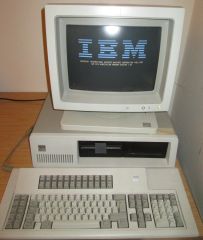 3270 PC with 5272 Color Display and 122-key keyboard
 -
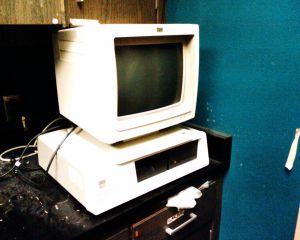 A 3270 PC system unit with colour display
 -
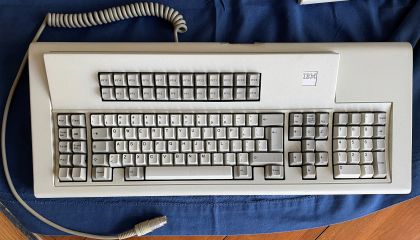 122-key Model F keyboard for the IBM 3179 G display station, similar to the 3270 PC keyboard
 -
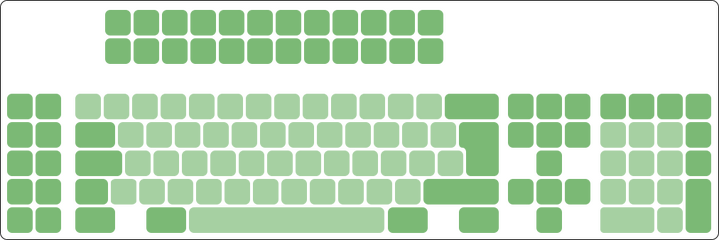 5271 keyboard key layout


Related pages
- IBM 3270 PC Maintenance Guide
- IBM 3270 PC Troubleshooting Guide
- IBM 3270 PC Capacitor Replacement Guide
- IBM 3270 PC/G and IBM 3270 PC/GX
- IBM PC XT (5160)
- IBM PC XT/370
References
- ↑ 1.00 1.01 1.02 1.03 1.04 1.05 1.06 1.07 1.08 1.09 IBM Announcement Letter 183-129, "IBM 3270 Personal Computer", 18 October 1983 (copy of IBM's online text at sharktastica.co.uk/resources/docs/IBM_183-129_3270PC_83.pdf). Models 2, 4 and 6 and their contents, general availability in the first quarter of 1984, the seven concurrent sessions, the host attachment modes, the slot allocation table and the Control Program storage table.
- ↑ 2.0 2.1 2.2 2.3 2.4 "IBM Personal Computers At a Glance", BYTE Guide to the IBM PC, Fall 1984, p. 24 (archive.org item byte-magazine-1984-09). 3270 PC and 3270 PC/G and GX specifications and US list prices.
- ↑ IBM, IBM Personal Computer Family Service Information Manual, SA38-0037-00, chapter 6, "5160 PC XT", p. 6-2. The 8088 at 4.77 MHz, and the 130 W system unit power supply with its rail currents and tolerances.
- ↑ 4.00 4.01 4.02 4.03 4.04 4.05 4.06 4.07 4.08 4.09 4.10 4.11 4.12 4.13 4.14 4.15 4.16 4.17 4.18 4.19 IBM, IBM Personal Computer Family Service Information Manual, SA38-0037-00, 1989, hosted as IBM Personal Computer Family Service Information Manual. Chapter 10, "3270 PC Products", pp. 10-1 to 10-17: system unit and display combinations, the 5271 model list, the 3270 unique error codes, the diagnostic tips (false 2801, XMA), the keyboard replacement part number and the ECA history. Chapter 18, "Personal Computer Parts Catalog", pp. 18-33 and 18-34: 5271, 5273, 5371 and 5373 FRU part numbers and the note on 5160 base system parts.
- ↑ 5.00 5.01 5.02 5.03 5.04 5.05 5.06 5.07 5.08 5.09 5.10 5.11 5.12 5.13 5.14 5.15 5.16 5.17 5.18 5.19 W. Craig Chambers, IBM 3270 Personal Computer Hints and Tips, IBM G320-9539-0, May 1986, hosted as File:IBM 3270 PC Hints and Tips G320-9539-0.pdf. Hardware section, pp. 1-19: power supply, slot rules, memory adapters and XMA, keyboard adapter versions and serial port, display pinout and frequencies, APA modes, DFCA versions, 3295 conversion, printer adapter, I/O ports and host attachment.
- ↑ 6.0 6.1 IBM, 3270 Workstation Program Version 1.0 User's Guide and Reference, 84X0982, April 1987, and Licensed Program Specification, 90X7283 (bitsavers.org/pdf/ibm/pc/3270/). The 90X7283 operating environment lists the PC XT (5160) and PC AT (5170) with the 3278/79 Emulation Adapter.
- ↑ 7.00 7.01 7.02 7.03 7.04 7.05 7.06 7.07 7.08 7.09 7.10 7.11 John Elliott, "The IBM 5271 (aka 3270 PC)", seasip.info/VintagePC/5271.html, 2012. Card complement, keyboard adapter ROMs 6323581 and 6323582, video BIOS on the keyboard adapter, keyboard adapter cable pinout, display adapter memory and I/O map, error codes 3201-3203 and 2801, host connect card versions, and use of the cards in other XT-class machines.
- ↑ 8.0 8.1 IBM, IBM 3270 Personal Computer: Using the Hardware, GA23-0249-1, July 1985, hosted as File:IBM 3270 PC Using the Hardware GA23-0249-1.pdf. Chapter 2, "Setting Up Your Keyboard", pp. 2-17 to 2-20; chapter 5, POST error chart, pp. 5-11 to 5-13.
- ↑ 9.0 9.1 9.2 9.3 9.4 9.5 9.6 IBM, IBM 3270 Personal Computer Maintenance Information, SY27-2567-2, third edition, October 1984, hosted as IBM 3270 PC Maintenance Information. Section 1, introduction; problem isolation chart 2800 (coaxial connection test and resistance check, pp. 3-2800-4 to 3-2800-11); keyboard adapter cable continuity check p. 3-300-15; section 7, parts catalogue (system unit p. 7-7, 5272 p. 7-15, keyboard p. 7-27).
- ↑ 10.0 10.1 IBM, IBM Personal Computer 3278/79 Emulation Adapter Technical Reference, 1502336, October 1983, hosted as File:IBM PC 3278-79 Emulation Adapter Technical Reference 1502336.pdf. Register descriptions (2D0h-2D6h), BNC connector and interrupt level 2.
- ↑ 11.0 11.1 IBM, Introducing the IBM 3270 Personal Computer/G and /GX Work Stations, GA33-3141-0, May 1984, hosted as File:Introducing the IBM 3270 PC G and GX Work Stations GA33-3141-0.pdf. Keyboard description, p. 31; dimensions and weights, Figures 34 and 35, p. 81.
- ↑ John Elliott, "The IBM 6110344 Keyboard", seasip.info/VintagePC/ibm_6110344.html. Protocol, scan code set, connector and controller of the 3270 PC keyboard.
- ↑ 13.0 13.1 13.2 Larry Augustin, "The Mainframe Connection: IBM's 3270 PC", BYTE Guide to the IBM PC, Fall 1984, pp. 231-237. Sessions, windows, window-to-window copying, SEND and RECEIVE, and building the Control Program system disk.
- ↑ 14.0 14.1 minuszerodegrees.net, "Short-circuit on the +5 volt line of an IBM 5150/5155/5160 motherboard" (5150_5160/MDC/tantalum_short_plus_5volts.htm) and "Commonly Failing Electronic Components (in vintage computers)" (failure/failure.htm). Tantalum count on the 5160 board, tantalum failure behaviour, and rupturing line suppression capacitors.