

IBM Color Graphics Adapter
| IBM Color/Graphics Monitor Adapter | |
|---|---|
 |
|
| An IBM Color/Graphics Monitor Adapter (CGA) | |
| Manufacturer | IBM |
| Type | 8-bit expansion-slot video adapter |
| Release date | 1981 (with the original IBM PC) |
| Interface | 8-bit IBM PC I/O channel |
| Compatible | IBM PC (5150), IBM PC XT (5160), IBM PC AT (5170), PC-compatible clones |
| Model | IBM publication 6361509 |
| Connectivity | 9-pin D-shell TTL RGBI (drives the IBM 5153); composite video on a phono jack; RF modulator header P1; light pen header P2 |
The IBM Color/Graphics Monitor Adapter, usually shortened to CGA, is IBM's colour video card for the IBM PC (5150). It uses a Motorola 6845 CRT controller and has 16 KB of display memory. It has three video outputs: a 9-pin D-shell direct-drive port for the IBM 5153, a composite video phono jack for a monitor or a television-frequency display, and a header for a user-supplied RF modulator to drive a home television. There is also a light pen interface.[1]
Video modes
[edit | edit source]| BIOS mode | Resolution | Colour |
|---|---|---|
| 0 | 40 × 25 text | Black and white (colour burst off) |
| 1 | 40 × 25 text | Colour |
| 2 | 80 × 25 text | Black and white (colour burst off) |
| 3 | 80 × 25 text | Colour |
| 4 | 320 × 200 graphics | Colour, 4 colours |
| 5 | 320 × 200 graphics | Black and white (colour burst off) |
| 6 | 640 × 200 graphics | Black and white |
Mode numbers from IBM's BIOS listing, where the black-and-white modes "operate same as color modes but color burst is not enabled".[2]
In text modes each character sits in an 8 by 8 box. A jumper at P3 selects the font: fitted for a 7 by 5 single-dot font, removed for a 7 by 7 double-dot font, both with one descender. In colour text modes each character can have one of 16 foreground and 8 background colours, and the border can be any of 16 colours. A 40-column screen uses 2,000 bytes and an 80-column screen 4,000 bytes, so the 16 KB buffer holds eight or four screens. The adapter runs non-interlaced at 7 or 14 MHz depending on the mode.[1]
IBM also documents a 160 × 100, 16-colour low-resolution graphics mode that the ROM BIOS does not support.[1]
The four-colour palettes
[edit | edit source]In 320 × 200 graphics, colour 0 (the background) can be any of the 16 colours. The other three come from one of two fixed sets, chosen by bit 5 of the colour-select register at hex 3D9: green, red and brown when the bit is 0, or cyan, magenta and white when it is 1. Bit 4 selects the intensified version of the set in graphics mode, and selects background colours in alphanumeric mode.[1]
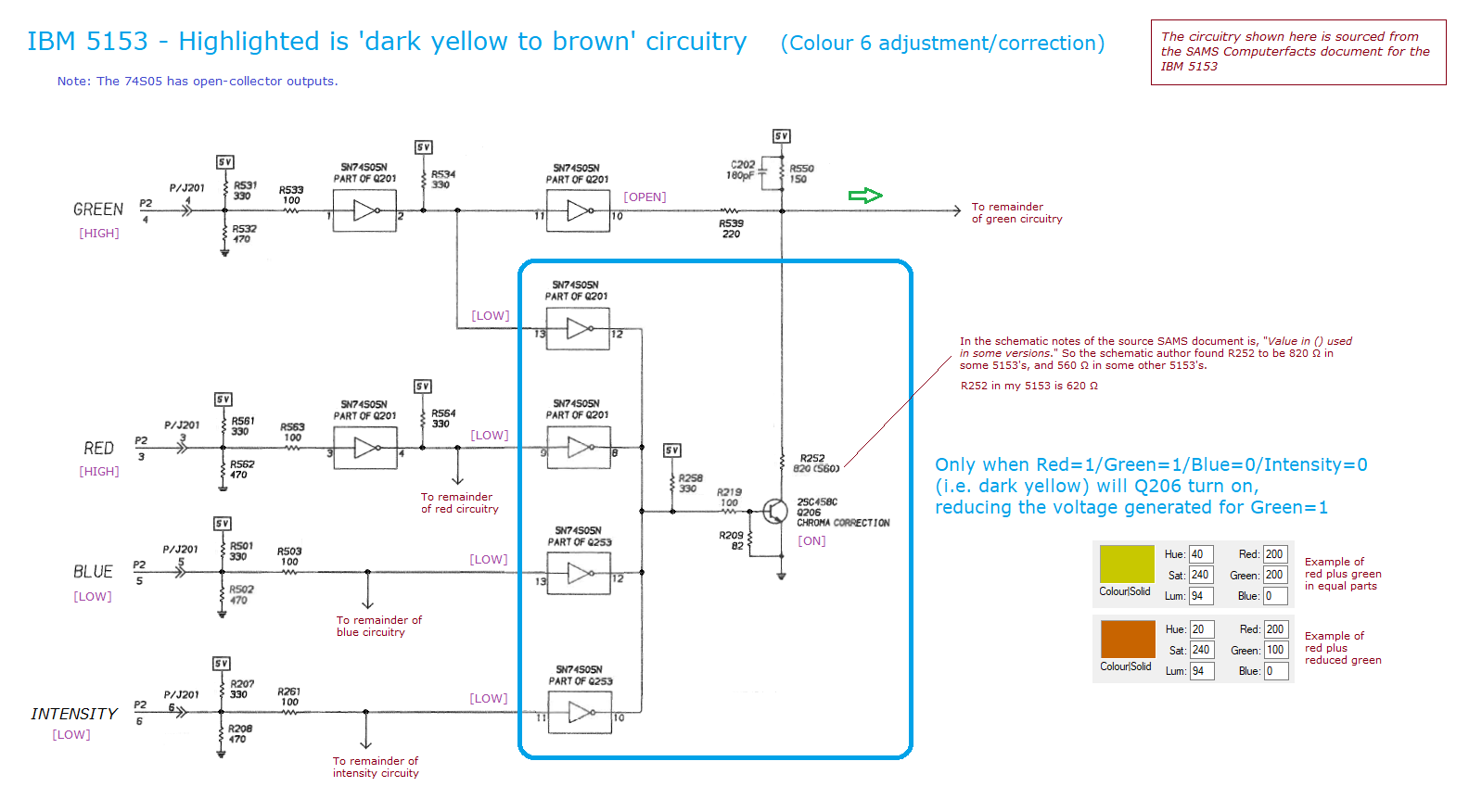
IBM's colour table names RGBI value 0110 "brown", not dark yellow.[1] The IBM 5153 has a circuit that reduces the green drive for that combination so it appears brown; monitors without it show dark yellow.[3]
Hardware
[edit | edit source]- Motorola 6845 CRT controller.[1]
- 16 KB of dynamic display memory, without parity, at hex B8000. IBM describes it as dual-ported between the processor and the display controller.[1]
- An 8 KB ROS character generator holding 256 characters, which the processor cannot read or write.[1]
- Direct-drive port: 9-pin D-shell, female. Composite video: standard female phono jack. Both are right-angle connectors through the rear panel.[1]
| Pin | P1, RF modulator (4-pin) | P2, light pen (6-pin) |
|---|---|---|
| 1 | +12 V | −Light pen input |
| 2 | Key (not used) | Key (not used) |
| 3 | Composite video output | −Light pen switch |
| 4 | Logic ground | Chassis ground |
| 5 | +5 V | |
| 6 | +12 V |
Source: IBM connector specifications.[1]
Setting up
[edit | edit source]With a CGA card as the only video card in a 5150 or 5160, set motherboard switches SW1-5 on and SW1-6 off for 80 × 25. For a composite monitor on which 80-column text is hard to read, set SW1-5 off and SW1-6 on to start in 40 columns. The composite output is NTSC.[4]
The card does not produce correct sync at the instant of power-on. It starts only when the BIOS power-on self test, or a diagnostic ROM, programs it.[4]
Common faults
[edit | edit source]- "Snow" in 80-column text is normal. IBM's reference says that in the high-resolution alphanumeric mode the processor should access the buffer only during horizontal retrace, and that "a small amount of display interference will result" otherwise.[1]
- A computer that will not power on with the CGA card fitted: suspect C8, a 10 µF 16 V tantalum that has a history of failing short and overloading the power supply. C8 and C9 filter the +12 V to the P1 and P2 headers, so if nothing is connected to them (or the card is in an IBM 5155 Portable, which takes only video from P1), a failed C8 can be clipped off and left out. A low-profile aluminium electrolytic may replace it.[5]
For the monitor side, see IBM 5153.
References
[edit | edit source]- ↑ 1.00 1.01 1.02 1.03 1.04 1.05 1.06 1.07 1.08 1.09 1.10 IBM, IBM Color/Graphics Monitor Adapter (6361509), Options and Adapters, Personal Computer Hardware Reference Library: description (pp. 1 to 3), display buffer and character generator (p. 5), alphanumeric and graphics modes (pp. 6 to 12), registers (pp. 15 to 22), and connector specifications (pp. 24 to 25). Hosted here as File:IBM Options and Adapters - IBM Color Graphics Monitor Adapter.pdf and described at IBM Options and Adapters - IBM Color Graphics Monitor Adapter.
- ↑ IBM, IBM Personal Computer Technical Reference (5150), System BIOS listing, VIDEO_IO "Set mode" comments, p. 5-75. Hosted here as File:IBM PC 5150 Technical Reference.pdf and described at IBM PC 5150 Technical Reference.
- ↑ IBM 5153: Dark yellow to brown circuitry, minuszerodegrees.net. Extract from the 5153 schematic.
- ↑ 4.0 4.1 IBM 5150/5160: Some IBM Expansion Cards and Options, minuszerodegrees.net, CGA section.
- ↑ IBM CGA Card: Capacitor C8, minuszerodegrees.net.
Related pages
[edit | edit source]- IBM 5153, the matching display
- IBM Monochrome Display Adapter, the text-only alternative
- IBM PC (5150) · IBM PC XT (5160) · IBM PC AT (5170)
- IBM Options and Adapters - IBM Color Graphics Monitor Adapter