

Grandstand TV Game 3000 General Maintenance

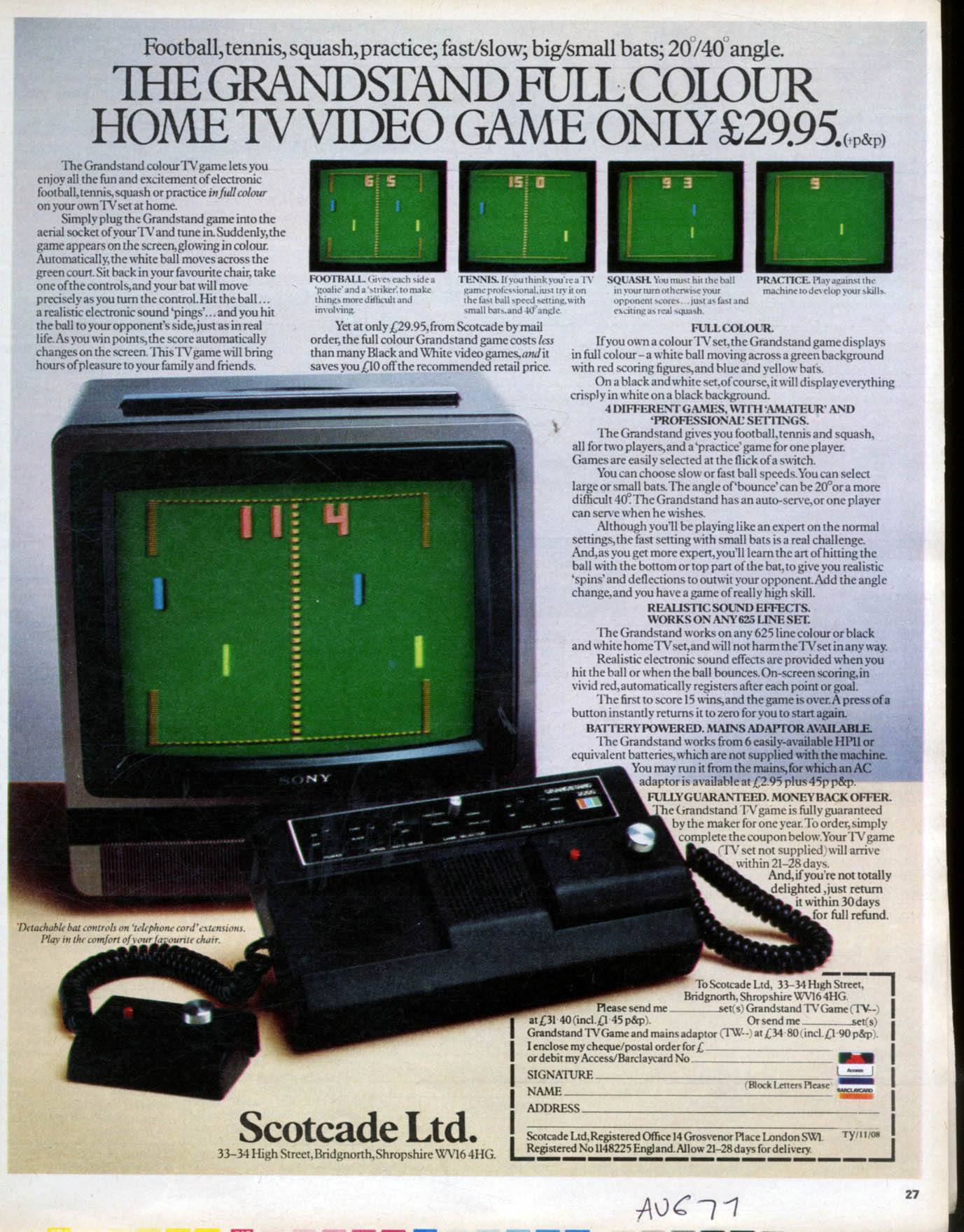
The Grandstand TV Game 3000 (Adman Grandstand TV Game 3000) is the colour version of Grandstand's first Korean-made Pong console, boxed as the "Adman MODEL 3000 GRANDSTAND T.V. GAME".[1] It plays football, tennis, squash and practice in colour on a 625-line television, and was sold by mail order in 1977.[2][3][4] No photograph of the inside of a 3000, no manual and no schematic has been found, so its game chip and colour circuit are unknown. What is known comes from the outside: museum photographs of a boxed example with its adaptor, a period advertisement, and the base label. Those show that the 3000 uses the same case, base and control boxes as the black-and-white Grandstand TV Game 2000, whose inside has been photographed.[5][6] Where the two are built the same, the 2000's guide is linked for the detail.
Fault-finding is on Grandstand TV Game 3000 Troubleshooting Guide. No capacitor data has been published for the 3000; Grandstand TV Game 3000 Capacitor Replacement Guide covers what is known and how to record and replace the parts.
The 3000 at a glance
[edit | edit source]| Part | Detail | Source |
|---|---|---|
| Picture | Colour on a 625-line colour set; white on black on a black-and-white set | [2] |
| Games and settings | Football, tennis, squash, practice; fast or slow ball; big or small bats; 20° or 40° angle; auto-serve on or off | [2][5] |
| Supply | 9 V DC from six UM-2 (C, HP11) cells, or a 9 V adaptor; 360 mW moulded on the base | [5][2] |
| Controls | Two control boxes on coiled leads, each with a knob and a red button; panel switches as on the 2000 | [5][2] |
| Game chip, colour circuit, RF channel, adaptor polarity | Not known: no inside photograph, manual or label gives them |
Before you start
[edit | edit source]- Take the cells out and unplug the adaptor.
- Have a cross-head screwdriver, isopropyl alcohol, switch and potentiometer cleaner and a multimeter to hand.
- The console runs from 9 V. If you use the original plug-in mains adaptor, check its case and lead before plugging it in: a cracked case or perished lead is where mains voltage can be touched.[5]
Opening the case
[edit | edit source]The base of the 3000 is the same as the 2000's: a battery cover released by two tabs marked OPEN, the model label beside it, the 360 mW moulding, and a rubber foot at each corner with a screw recessed in it.[5][6]
- Release the battery cover and take out the six cells.
- Turn the console over onto a soft cloth with the control boxes in their recesses.
- Remove the screws from inside the four feet. A small screw beside one corner on the museum's example is in the same place as one on the photographed 2000; check whether it also holds the base.[5][6]
- Lift the base slowly, watching for wires between the halves.
On the 2000, everything except the battery cover stays in the upper half, with the board held at its corners and the RF modulator on a separate metal plate; the steps for lifting it out are on the 2000's maintenance guide.[6] Nobody has published a photograph of a 3000's board, so expect differences: the 3000 needs a colour circuit that the 2000 does not have. Photograph the inside before you disturb anything, and record the chip markings.
Control boxes
[edit | edit source].jpg)
Each control box has a knob for the bat and a red button, and sits in a recess in the top of the console. The leads are coiled "telephone cord" extensions, so the boxes can be lifted out and used away from the console.[2][5] On the 2000 the left button serves and the right one resets the score; the advertisement for the 3000 describes both functions.[2][6]
- The underside of each box is a galvanised metal plate held by a screw at each corner.[5] Remove the four screws to reach the knob's potentiometer and the button.
- If a bat jumps or jitters, spray potentiometer cleaner into the track and turn the knob end to end. Measure the potentiometer before replacing it and fit the same value: Grandstand's value has not been published.
- Check both ends of each lead for cracked insulation, and test each conductor for continuity while flexing the lead.
Panel switches
[edit | edit source]The panel has POWER, SPEED, AUTO SERVE, a GAME SELECTOR lever, ANGLE and BAT SIZE.[5] The advertisement groups them as "amateur" and "professional" settings.[2] Work each switch end to end a dozen times with a little switch cleaner. A switch that has to be wiggled to select its setting is dirty, not broken.
Power
[edit | edit source]- Six C cells (sold then as HP11 or UM-2) fit behind the battery cover.[2][5]
- The label asks for "AC ADAPTER 9V" and gives no current or polarity.[5] The base moulding gives 360 mW at 9 V DC, which is 40 mA.[5]
- The museum's example came with its own plug-in adaptor.[3] If yours has one, measure its output unloaded and with a small load before use, and check which way round the plug is wired.
- No source gives the 3000's socket polarity. The owner of a TV Game 2000, in the same case, gives that console's socket as centre negative,[4] but the 3000's board has not been seen, so measure it: check which socket contact goes to the battery compartment's positive terminal.
- The Grandstand Universal Mains Adaptor was sold for Grandstand's handheld and tabletop games, with a 6-9 V output and a polarity switch,[7] and the tabletop leaflets set it to negative.[8] Check its plug with a meter before using it on a 3000.
Remove the cells for storage. If they have leaked, see Battery Explosion, Capacitor or Corrosion Damage.
RF output and picture
[edit | edit source]- The RF lead is fixed and leaves the rear of the case through a grommet.[5]
- The advertisement says the 3000 works on any 625-line set, colour or black and white.[2] No source gives its channel. Tune an analogue UHF television slowly across the band with the console on.
- On a colour set the picture should be a green background with a white ball, blue and yellow bats and red scores.[2] If the colours are missing on a set that shows colour from other sources, see Grandstand TV Game 3000 Troubleshooting Guide.
- There is a small hole in the middle of the rear edge, in the place of the 2000's HORI-HOLD adjustment.[5][6] Its purpose on the 3000 is not documented. Mark its position before turning anything behind it.
What wears
[edit | edit source]| Part | Check |
|---|---|
| Control-box potentiometers | Open the box by its metal base plate and clean; measure before replacing |
| Coiled leads | Flex-test both ends |
| Panel switches and game lever | Clean and work each one |
| Adaptor socket and RF plug | Clean the contacts |
| Electrolytic capacitors | Not documented for the 3000; inspect any you find for bulging or leaks. The 2000 in the same case had one burst.[6] |
| Battery springs | Remove cells for storage |
Storage
[edit | edit source]- Remove the cells.
- Keep the console dry, with the control boxes in their recesses and the coiled leads relaxed.
- Keep the adaptor with the console, and check it before each use.
Preventive maintenance checklist
[edit | edit source]- Remove the cells and check the springs.
- Measure the adaptor and the socket's polarity before connecting them.
- Clean the panel switches and the game lever.
- Open each control box by its four base-plate screws and clean the potentiometer.
- Flex-test the coiled leads.
- Tune a colour television and check the green background, the red scores and both bats.
- If you open the base, photograph the board and note the chip markings.
Related pages
[edit | edit source]- Grandstand TV Game 3000
- Grandstand TV Game 3000 Troubleshooting Guide
- Grandstand TV Game 3000 Capacitor Replacement Guide
- Grandstand TV Game 2000 General Maintenance, the black-and-white model in the same case
- Grandstand Universal Mains Adaptor
- Battery Explosion, Capacitor or Corrosion Damage
- Recommended Tools
References
[edit | edit source]- ↑ Photograph by Edelseider at the Pixel Museum, File:Grandstand Admam 3000.jpg (CC BY-SA 4.0, from Wikimedia Commons): the console in front of its box ("Adman MODEL 3000 GRANDSTAND T.V. GAME", "COLOUR VIDEO T.V. GAME") with both control boxes out of their recesses and a small round sticker in the right-hand recess.
- ↑ 2.00 2.01 2.02 2.03 2.04 2.05 2.06 2.07 2.08 2.09 2.10 Scotcade Ltd, Bridgnorth, mail-order advertisement "The Grandstand full colour home TV video game only £29.95 (+p&p)", magazine page 27, scan at fulltable.com with a handwritten "AUG 77" (retrieved 2026-10-18), read in full: football, tennis, squash and practice; fast or slow ball, big or small bats, 20° or 40° angle, auto-serve or serve by one player, "amateur" and "professional" settings; on a colour set a white ball, a green background, blue and yellow bats and red scores, and on a black-and-white set everything white on black; works on any 625-line set; sound effects when the ball is hit or bounces; the first to score 15 wins, and a button returns the score to zero; six HP11 batteries, or a mains adaptor at £2.95; detachable bat controls on "telephone cord" extensions; guaranteed by the maker for one year. The model number is not legible in the scan.
- ↑ 3.0 3.1 Museum of Design in Plastics, Arts University Bournemouth, "Grandstand TV Game 3000 console", AIBDC 0_2556 (retrieved 2026-10-18): a Grandstand TV Game "with two handsets in its original illustrated box. Complete with its power supply adaptor"; inscription "Adman Grandstand TV Game 3000. Made in Korea. Power supply 9V - DC Ax Adamptor 9v"; made in Korea; dated about 1977 to 1979.
- ↑ 4.0 4.1 José Antonio Ortigueira Amor, "Adman Grandstand TV Game 2000 (WK-I HB) (1977)", Retro Ordenadores Orty (collector's blog, in Spanish), 7 November 2023 (retrieved 2026-10-18): Adam Import's first consoles, models 1000, 2000 and 3000 of 1977, were made in Korea; on the owner's TV Game 2000 four screws hold the lower case and the rear socket takes 9 V DC with the centre negative.
- ↑ 5.00 5.01 5.02 5.03 5.04 5.05 5.06 5.07 5.08 5.09 5.10 5.11 5.12 5.13 5.14 Photographs on the Museum of Design in Plastics record for AIBDC 0_2556 (non-commercial educational use only; examined at the largest size offered, retrieved 2026-10-18). They show the panel (POWER ON/OFF, SPEED FAST/SLOW, AUTO SERVE ON/OFF, a GAME SELECTOR lever for FOOTBALL, TENNIS, SQUASH and PRACTICE, ANGLE 20°/40°, BAT SIZE LARGE/SMALL, and a red, green and blue block beside "GRANDSTAND ADMAN TV GAME 3000"); one control box turned over, its underside a galvanised metal plate held by a screw at each corner; a "Q.A. PASS" sticker in the right-hand recess; coiled leads to both control boxes; the base, with a battery cover held by two tabs marked OPEN, the label "ADMAN GRANDSTAND / TV GAME 3000 / POWER SUPPLY: 9V-DC (6xUM-2 BATTERY) OR AC ADAPTER 9V / MADE IN KOREA", the moulding "POWER CONSUMPTION 360mWATT, 9V DC", a rubber foot at each corner with a screw recessed in it and a small screw beside one corner; along the rear edge, a plug in the adaptor socket, a small hole in the middle and the fixed RF lead in a grommet; and the plug-in mains adaptor.
- ↑ 6.0 6.1 6.2 6.3 6.4 6.5 6.6 The black-and-white Grandstand TV Game 2000 in the same case: photographs File:Grandstand Adman TV Game 2000 (1).jpg, File:Grandstand Adman TV Game 2000 (5).jpg and File:Grandstand Adman TV Game 2000 (8).jpg (José Antonio Ortigueira Amor, CC BY 4.0, from Wikimedia Commons) show the same base, feet, battery cover and rear layout (RF lead, HORI-HOLD hole, AC 9V ADAPTOR socket), and inside a board screwed to the upper case at its corners with a separate KDC modulator; see Grandstand TV Game 2000 General Maintenance.
- ↑ Handheld Museum, "Grandstand Universal Mains Adapter" (retrieved 2026-10-18). Collector's entry: model UGT, "AC adapter sold by Grandstand in England/U.K. for their handheld/tabletop games", for 240 V mains, with a switch that toggles the polarity and turns the output off; output 6-9 V DC at 1.5 VA.
- ↑ Grandstand, Astro Wars instruction leaflet (Adam Leisure Group, 1981), p. 2: the game "can be operated from the mains with a GRANDSTAND Universal Mains Adaptor (not included). Set polarity switch to negative polarity." Hosted here as File:Grandstand Astro Wars Instructions.pdf.
.jpg)
.jpg)
.jpg)