

Atari XEP80
| Atari XEP80 Interface Module | |
|---|---|
 |
|
| Atari XEP80 Interface Module | |
| Manufacturer | Atari Corporation; made in Taiwan[1] |
| Type | 80-column video display controller and parallel printer port |
| Release date | Shown June 1986; shipped September 1987[1][2] |
| Discontinued | Mid-1989[2] |
| Interface | Joystick port 1 or 2 (two PIA lines); DB25 parallel printer port[3] |
| Compatible | Atari XE, XL, 400 and 800 computers[4] |
| Dimensions | 40 × 240 × 142 mm (H × L × W)[3] |
| Weight | 550 g[2] |
| Power | 9 V DC, 500 mA adaptor (2600 type); draws 400 mA[3] |
The Atari XEP80 Interface Module is an 80-column text display and parallel printer interface for the Atari 8-bit computers, sold by Atari Corporation from September 1987.[1] It plugs into joystick port 1 or 2, drives a composite video monitor with an 80 by 25 character display, and adds a standard 8-bit parallel port for Epson, Centronics and similar printers.[3] A software handler loaded from disk at boot time redirects the screen editor and printer devices to the module.[4]
History
[edit | edit source]The design began as the video adapter of the XM128 monitor and adapter announced at the Winter CES in January 1985. Atari previewed it as an "80-column adapter" at the first Atari Computer Show in London in March 1986, showed it at CeBIT that month, introduced it as the XEP80 at the Summer CES in June 1986, and shipped it in September or October 1987.[1] The Atari Computermuseum says it grew out of the SPC and 80CVC cards designed for the unreleased 1090 expansion system, and gives the end of production as mid-1989.[2] Jose Valdes was the key hardware engineer and Lane Winner wrote the software.[1] AtariWriter 80, the 80-column version of AtariWriter Plus, shipped in May 1989 and needed the XEP80.[1]
Specifications
[edit | edit source]| Item | Value |
|---|---|
| Text display | 80 columns by 25 lines, in a 256-column by 25-line buffer that scrolls horizontally |
| Graphics mode | 320 by 200 dots, bit-mapped |
| Video output | Composite monochrome, through an RCA-type video cable |
| Printer port | 8 data bits, strobe, busy and ground on a DB25 female connector |
| Computer link | Serial at 15.7 kbit/s over two joystick-port lines; 9-bit words (8 data bits and a data/command bit) |
| Power | 9 V DC 500 mA adaptor; current draw 400 mA |
| Size | 40 × 240 × 142 mm |
The values are from Atari's specification.[3] The FAQ adds that the video can be 60 Hz or 50 Hz, selected in software, and that the XEP80 sends 250 lines per field at 60 Hz (against the NTSC standard of 243) and 300 at 50 Hz (against 288). Colour televisions and monitors usually need adjusting to show the whole picture.[1] The XEP80 has no audio output.[4]
Hardware
[edit | edit source]Hans-Christof Tuchen's description of the board gives a National Semiconductor NS405 terminal management processor, an 8048-family part with no internal ROM in this version; its program is in a 2364 ROM, the character sets in a second ROM, and the screen in an 8 KB static RAM.[5] Jerzy Sobola's redrawn schematic shows the NS405 (U4) with a 12 MHz crystal, a 2364 program ROM (U2), a 6264 static RAM (U7) and a 2764 character ROM (U12). The 9 V DC input passes the power switch SW1 and a choke to a 7805 regulator (U14) with a 470 µF capacitor (C18); a transistor stage (Q1) drives the video output.[6] Tuchen gives the character ROM as a 2364; the two sources disagree.[5][6]
.jpg)
Connector pinouts
[edit | edit source]| Joystick port pin | Function | Parallel port pin | Function |
|---|---|---|---|
| 1 | Data to XEP80 | 1 | Strobe |
| 2 | Data from XEP80 | 2–9 | Data |
| 3–7 | Not used | 10 | Not used |
| 8 | Ground | 11 | Busy |
| 9 | Not used | 12–17 | Not used |
| 18–25 | Ground |
The pinouts are from the owner's manual and the specification.[4][3]
Setting up
[edit | edit source]- Switch everything off. Connect the computer system as usual, but leave the monitor off the computer.
- Plug the XEP80's fixed cable into joystick port 1 or 2.
- Connect the video cable from the XEP80's Monitor jack to the monitor's Video In.
- Plug the adaptor into the XEP80's Power jack.
- Switch on the XEP80, monitor and disk drive first, insert the XEP80 boot disk, then switch on the computer.[4]
Atari recommends a monochrome composite monitor; a colour monitor works, but a television cannot show the 80-column display. For sound, connect the computer's own monitor cable to an audio input separately.[4] Holding SHIFT while the handler loads keeps the normal 40-column screen and uses the XEP80 only as a parallel printer port.[4]
The handler, AUTORUN.SYS, loads below the top of free memory and takes about 1.5 KB. It checks whether the computer is NTSC or PAL, replaces the E:, S: and P: handlers and switches off ANTIC's display.[3] P1: is the XEP80's parallel port; P2: to P8: are the 850, 1025, 1020, 1027, 1029, XMM801 and XDM121.[4] Programs that write to screen memory directly do not work with the XEP80; programs that use the standard E: device do.[4]
Faults and care
[edit | edit source]| Symptom | Probable cause | Action |
|---|---|---|
| Blank screen | Loose cable; computer switched on before the XEP80 and drive[4] | Switch off, check each connection, then switch on the peripherals before the computer. |
| Works with the original boot disk but not with a copy | Garbled working disk[4] | Make a new copy. |
| A program shows nothing or garbage on the 80-column screen | The program writes to screen memory directly[4] | Use the program on the 40-column screen; boot with SHIFT held to keep the printer port. |
| Top and bottom of the display missing, or the picture too tall at 50 Hz | More scan lines per field than a standard picture[1][7] | Adjust the monitor's height and position; readjust when going back to the computer's own display. |
| No sound | The XEP80 has no audio output[4] | Wire the computer's monitor cable to an audio input. |
Erhard Pütz, who worked with the XEP80 from 1993, names the constant swapping of video plugs and the readjusting of picture height, horizontal position and brightness as its most annoying features, and describes the 50 Hz picture as significantly taller than the normal XL/XE screen.[7] AtariWiki also hosts a handler patched for PAL machines and an alternative driver from the Altirra Additions disk, which it describes as faster than Atari's.[8]
Atari's care advice is to keep the module on a firm, level surface, away from dust, heat, moisture and direct sunlight, and to clean the case only with a soft, slightly damp, lint-free cloth.[4] The adaptor is the 9 V DC, centre-positive type used with the 2600 and SX212 (Atari C010472, C016353 or C018084).[1]
Documentation
[edit | edit source]- Atari XEP80 Documentation: the owner's manual and Atari's product specification.
- Atari XEP80 Interface Module Owner's Manual, C026416-0A1 Rev. A (1987).
- Product Specification For XEP80, 26 January 1987.
Gallery
[edit | edit source]-
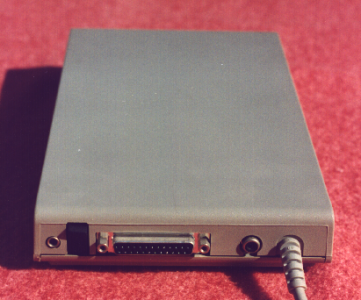 Rear: jacks, switch, DB25 printer port and the fixed joystick-port cable
.png)
Related pages
[edit | edit source]References
[edit | edit source]- ↑ 1.0 1.1 1.2 1.3 1.4 1.5 1.6 1.7 1.8 Michael D. Current (ed.), Atari 8-Bit Computers: Frequently Asked Questions, last modified 2 August 2026, mcurrent.name (retrieved 2026-10-06). Section 6.1.1 (the XEP80: video, scan lines, parallel port, boot disk, designers, power, manual), section 6.2 (9 V DC adaptors C010472, C016353 and C018084, centre positive) and the 1985 to 1989 chronology in section 11.1. Community reference.
- ↑ 2.0 2.1 2.2 2.3 Atari Computermuseum, "XE-Peripherie: Atari XEP80", atari-computermuseum.de (retrieved 2026-10-06), in German. Origin in the 1090 cards, end of production, weight.
- ↑ 3.0 3.1 3.2 3.3 3.4 3.5 3.6 Atari, Product Specification For XEP80: 80 Column and Parallel Printer Board, 26 January 1987 (firmware rev. 41.1, handler rev. 70.0). Section 1 (package, statistics, general information), section 2 (physical interface and pinouts), section 3 (software interface), section 4 (communications). Hosted as File:Atari XEP80 Product Specification (1987).pdf.
- ↑ 4.00 4.01 4.02 4.03 4.04 4.05 4.06 4.07 4.08 4.09 4.10 4.11 4.12 4.13 Atari Corporation, Atari XEP80 Interface Module Owner's Manual, C026416-0A1 Rev. A, 1987. Introduction (compatible software); chapter 1, pp. 3–9 (system components, connecting, sound, boot disk, booting, printer-only use, printer port selection); chapter 2, pp. 11–12 (troubleshooting and preventive maintenance); appendix B, p. 17 (pinouts). Hosted as File:Atari XEP80 Interface Module Owner's Manual C026416.pdf.
- ↑ 5.0 5.1 Hans-Christof Tuchen, "NS405: the heart of the XEP80", first published in ABBUC Magazin 50, English text on Mathy van Nisselroy's site, mathyvannisselroy.nl (retrieved 2026-10-06).
- ↑ 6.0 6.1 Jerzy Sobola, "XEP80 Atari Interface", redrawn schematic, sheet 1 of 3, 5 August 2000, published on AtariWiki. Hosted as File:Atari XEP80 schematic sheet 1 (Jerzy Sobola redraw).jpg.
- ↑ 7.0 7.1 Erhard Pütz, "The XEP 80 – Part 1", translated by Mathy van Nisselroy, on AtariWiki, page "XEP80", atariwiki.org (retrieved 2026-10-06). User experience with the monitor adjustments.
- ↑ AtariWiki, "XEP80", sections "ATR-Image" and "Drivers", atariwiki.org (retrieved 2026-10-06). Original boot disk DX5087, PAL-patched handler and the Altirra Additions driver.