

Apple GeoPort Telecom Adapter
| Apple GeoPort Telecom Adapter | |
|---|---|
.jpg) |
|
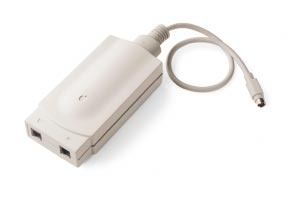
| A GeoPort Telecom Adapter with its line and telephone jacks at the front and its fixed GeoPort cable (photo: Apple Rescue of Denver) | |
| Manufacturer | Apple Computer, Inc. |
| Type | Telephone line adapter (software modem) |
| Interface | GeoPort (9-pin mini-DIN modem port) |
| Compatible | Macintosh Centris 660AV, Macintosh Quadra 660AV, Macintosh Quadra 840AV and most Power Macintosh models |
| Model | M1694LL/A, M1694LL/B, M3127LL/A; GeoPort Telecom Adapter Kit M5438LL/A (Adapter II) |
| Connectivity | Two RJ-11 jacks (line and telephone) |
| Power | From the GeoPort's extra pin: 5 V ±5% at 500 mA |
The Apple GeoPort Telecom Adapter is a small box that connects a GeoPort-equipped Macintosh to an analog telephone line. Apple describes it as a serial communications chip and a codec sitting between the computer's GeoPort and the telephone jack. The modem itself is software: the on-board DSP of the Quadra 660AV and 840AV, or the PowerPC processor of a Power Macintosh, generates and decodes the modem and fax signals.[1][2] It first came as the "pod" for the AV Macintosh models in 1993, and Apple later replaced it with the GeoPort Telecom Adapter II.[3] A version for the Power Macintosh, M3127LL/A, was listed by June 1994.[4]
The adapter plugs into the modem port, which on GeoPort machines has a ninth pin carrying power for it, so it needs no power supply or battery.[5][6]
Models
[edit | edit source]| Order number | For | International use |
|---|---|---|
| M1694LL/A | Quadra 660AV and 840AV | No |
| M1694LL/B | Quadra 660AV and 840AV | Yes |
| M3127LL/A | Quadra AV and Power Macintosh | Yes |
The M1694LL/A could not break dial tone on some very old telephone equipment and was for use only in the United States. The M1694LL/B corrected the problem caused by transposed tip and ring wires. Its software did not support the Power Macintosh, although with the right software the hardware would work there. The M3127LL/A is essentially the M1694LL/B with software for both Quadra AV and Power Macintosh computers.[4] The box held the adapter, the Getting Started With Your GeoPort Telecom Adapter manual, the Express Fax/Modem User's Guide, a telephone cord and the Express Modem software disk.[1]
GeoPort Telecom Adapter II
[edit | edit source]Apple's 1997 GeoPort Telecom Adapter Kit (M5438LL/A) contains the GeoPort Telecom Adapter II, Apple Telecom 3.1 and AppleCom Lite. With that software the adapter works as a V.34 modem at up to 28,800 bit/s, a V.17 fax at 14,400 bit/s, a full-duplex speakerphone and a digital answering machine. The kit needs a Power Macintosh other than the 5200, 5300, 6200 and 6300 series, or a PowerPC Performa such as the 6100, 6360 or 6400, and System 7.1.2 or later.[7]
| Item | Value |
|---|---|
| Size | 1.5 × 2.8 × 5.7 in (3.8 × 7.1 × 14.5 cm) for the pod; 7.7 in (19.6 cm) deep with the standoff |
| Weight | 0.46 lb (0.21 kg) for the pod; 0.67 lb (0.30 kg) with the cable |
| Power | From the computer, through an extra line on the cable; no separate supply or battery |
| Operating temperature | 10-40 °C |
| Storage temperature | -40 to 65 °C |
| Humidity | 20-90%, non-condensing |
| Data standards | V.34 (28,800 to 4800 bit/s), V.32bis, V.32, V.22bis, Bell 212A, V.22, V.23, V.21, Bell 103 |
| Fax standards | V.27 ter, V.29, V.17 (up to 14,400 bit/s), with fax error correction mode |
| Error control and compression | V.42 and V.42bis; MNP classes 2-5 |
Computers
[edit | edit source]The adapter needs a GeoPort. Apple lists the Quadra 660AV and 840AV and the Power Macintosh family, except the Power Macintosh 5200/75 LC and the Performa 5200 and 6200 (the 6200 only in Europe).[1] The GeoPort 2.3 software lists the Centris 660AV, Quadra 660AV and 840AV, and the Power Macintosh 6100, 7100, 7200, 7500/100, 8100, 8500/120 and 9500 series.[8] The Quadra AV models cannot connect at 28,800 bit/s and do not get V.34 or V.17 fax.[5]
GeoPort pin assignments
[edit | edit source]| Pin | Standard serial port | GeoPort, DMA | GeoPort, non-DMA |
|---|---|---|---|
| 1 | HSK(o) | POD RESET/ATT | POD RESET/ATT |
| 2 | HSK(i) | SCLK(i) | SCLK(i) |
| 3 | TxDa- | TxDa- | TxDa- |
| 4 | Shield ground | Ground return | Ground return |
| 5 | RxDa- | RxDa- | RxDa- |
| 6 | TxDa+ | TxDa+ | TxDa+ |
| 7 | GPi(A) | WAKEUP/TxHS | Unused |
| 8 | RxDa+ | RxDa+ | RxDa+ |
| 9 | +5 V DC | DC power | DC power (if available) |
Source: Apple Tech Info Library article 16199.[9] Apple's 1996 user's guide gives the adapter's supply as 5 V ±5% at 500 mA; Wikipedia gives 350 mA as the maximum on pin 9.[5][3]
Line interface
[edit | edit source]The adapter works only on analog lines, not on digital telephone systems.[1] It uses only the centre pair of the RJ-11 jack (pins 2 and 3, red and green). On a four-wire, two-line socket the second line on pins 1 and 4 must be rewired to pins 2 and 3 before the adapter can use it.[10] The ringer equivalence number is 0.7B, and the adapter detects ringing between 14 and 1200 Hz. Keep the total REN of everything on the line within the telephone company's limit, usually 5, or devices may not ring.[11] The adapter is surge-protected, with a 300 V clamp and a fuse.[12]
Connecting it
[edit | edit source]- Plug the adapter's cable into the modem port, marked with a telephone handset icon, on the back of the computer.
- Plug the supplied telephone cable into the adapter's line port and into the wall socket.
- Plug a telephone into the adapter's telephone port if you want one on the same line.
- Install the Apple Telecom software.[5]
On machines with a GeoPort Internal Modem, leave the external modem port empty. Only the internal modem is active, and programs that use the modem port are redirected to it.[5]
Software
[edit | edit source]The adapter came with the Express Modem software also used by the Apple Express Modem, plus GeoPort extensions and the Shared Library Manager.[1][6] Apple Telecom 2.0 added QuickDraw GX support and network shared fax.[13] The 1997 Adapter II kit's Apple Telecom 3.1 adds V.34 data, a full-duplex speakerphone and an answering machine.[7] The adapter takes its processing from the host computer, and Wikipedia notes that GeoPort adapters used a great deal of processor time.[3]
Troubleshooting
[edit | edit source]Apple's checks, from the 1996 user's guide:[5]
- Unplug and reconnect the telephone cable and check the other connections.
- If you use the Express Modem software, open its control panel and check that it is On. If On will not stay selected, or the control panel does not open, reinstall the software.
- Turn up the volume in the Sound or Monitors and Sound control panel, enter terminal mode in a communications program and dial your own number. An engaged tone means the adapter is connected properly.
- No dial tone: plug a working telephone into the wall jack. If that has no dial tone either, the line is at fault, or it may be a digital line, on which the adapter will not work. If the telephone works but the adapter does not, try the adapter's cable on the telephone.
- At restart, the Apple Fax and Express Modem icons at the bottom of the screen should be animated if the software is installed.
Faults Apple's Tech Info Library describes:
- Connects then drops at once: check that the full GeoPort software set is installed (Shared Library Manager, ASLM Resources, GeoPort Extension, GeoPort Telecom Adapter and GeoPort Telecom). If it is, try turning error correction off with &Q0 in the modem string.[6]
- Will not connect to modems without V.42bis: make sure register S47 is not 0. Programs that send data on CARRIER, before CONNECT, make the software hang up; add W0 to the initialisation string.[14]
- "Port in use" when answering with ATDT in originate mode: there is a 6-second delay after a ring is detected. Use ATH1DT instead.[15]
- Not enough memory to open Apple Fax: turning the Express Modem off frees about 600K. Programs that need the modem turn it back on.[5]
- Faxes failing: send again; avoid File Sharing transfers during a fax; turn off V.17, then ECM, in the Apple Fax modem preferences.[5]
Documentation
[edit | edit source]- Apple GeoPort Telecom Adapter Documentation: Getting Started With Apple Telecom (1996) and the GeoPort Telecom Adapter Kit data sheet (1997).
- Apple Express Modem Documentation: the Express Fax/Modem User's Guide (1994) that came with the first adapters.
Gallery
[edit | edit source]-
 GeoPort Telecom Adapter II, from Apple's May 1997 data sheet
.jpg)
Related pages
[edit | edit source]- Apple Express Modem
- Macintosh Quadra 840AV
- Apple QuickTake 100, which can transfer pictures over the GeoPort
References
[edit | edit source]- ↑ 1.0 1.1 1.2 1.3 1.4 Apple Computer, Tech Info Library article 12729, "GeoPort Telecom Adapter: Description", created 29 July 1993, updated 3 November 1995. Copy at absurdengineering.org. GeoPort architecture; the Telecom Adapter is a line interface for analog lines only, used with the AV models' DSP or the PowerPC processor; 14.4 kbit/s data and 9600 bit/s fax with the bundled Express Modem software; supported standards; box contents; adapter models M1694LL/A, M1694LL/B and M3127LL/A.
- ↑ Apple Computer, Tech Info Library article 12734, "GeoPort Telecommunications Architecture", created 29 July 1993, updated 23 August 1995. Copy at absurdengineering.org. The GeoPort Telecom Adapter is a simple low-cost device with a serial communications chip and a codec (analog) or digital interface chip, sitting between the 9-pin modem/GeoPort port and the telephone jack; it connects to standard analog lines.
- ↑ 3.0 3.1 3.2 Wikipedia, "GeoPort" (read 4 October 2026). The adapter first came as the "pod" with the AV Macs in 1993 and was sold separately for PowerPC Macs from early 1995; three adaptors were sold: the original pod, the internal version and the GeoPort Telecom Adapter II; the adaptors used a lot of processor time; GeoPort pinout with +5 V on pin 9 at 350 mA maximum. History and general description. Wikipedia dates the separate Power Macintosh release to early 1995; Apple's Tech Info Library listed the Power Macintosh model M3127LL/A in June 1994.
- ↑ 4.0 4.1 Apple Computer, Tech Info Library article 15555, "GeoPort Adapter: Version Differences", created 7 June 1994. Copy at absurdengineering.org. The three adapter models, which may be used outside the United States, the M1694LL/A dial-tone problem with old equipment, and the M1694LL/B transposed tip-and-ring fix.
- ↑ 5.0 5.1 5.2 5.3 5.4 5.5 5.6 5.7 Apple Computer, Getting Started With Apple Telecom (GeoPort Telecom Adapter Kit user's guide), part number 030-9853-A, 1996. Hosted as File:Getting Started With Apple Telecom (GeoPort Telecom Adapter Kit, 1996).pdf. Chapter 1, pp. 2-8: package, connecting the GeoPort Telecom Adapter to the modem port and telephone line, internal modems. Appendix A, pp. 56-59: hardware power and environment specifications; Apple Serial Modem and Express Modem software specifications. Appendix B, pp. 62-68: tips and troubleshooting.
- ↑ 6.0 6.1 6.2 Apple Computer, Tech Info Library article 16986, "GeoPort Telecom Adapter: Frequently Asked Questions", created 10 January 1995, updated 02 July 1996. Copy at absurdengineering.org. REN 0.7 and ring frequency 14-1200 Hz; connect-then-disconnect problems (install the GeoPort software, or turn off error correction with &Q0); difference between the modem port and the GeoPort (ninth pin for power; the DSP or PowerPC does the modem work).
- ↑ 7.0 7.1 7.2 Apple Computer, GeoPort Telecom Adapter Kit data sheet, L00934C, May 1997. Hosted as File:Apple GeoPort Telecom Adapter Kit data sheet (1997).pdf. Kit contents (GeoPort Telecom Adapter II, Apple Telecom 3.1, AppleCom Lite), features, power from the computer through an extra line on the cable, environment, size and weight, modem and fax standards, system requirements.
- ↑ Apple Computer, Tech Info Library article 18905, "GeoPort 2.3 and Compatible Computers", created 8 November 1995. Copy at absurdengineering.org. Computers compatible with the GeoPort 2.3 Telecom Adapter software.
- ↑ Apple Computer, Tech Info Library article 16199, "GeoPort Telecom Adapter: Pin assignments", created 6 September 1994. Copy at absurdengineering.org. Mini-DIN-9 pin assignments for the GeoPort Telecom Adapter.
- ↑ Apple Computer, Tech Info Library article 16596, "GeoPort Adaptor & Multiple-Line Analog Telephone Lines", created 24 October 1994. Copy at absurdengineering.org. The adapter is wired only to pins 2 and 3 (red and green) of the telephone connector; a second line on pins 1 and 4 must be moved to pins 2 and 3.
- ↑ Apple Computer, Tech Info Library article 15861, "GeoPort Adapter: Ringer Equivalence Number & Frequency", created 18 July 1994, updated 23 August 1994. Copy at absurdengineering.org. REN 0.7B; ring frequency range 14-1200 Hz; total REN on a line normally not above 5.
- ↑ Apple Computer, Tech Info Library article 14484, "GeoPort Telecom Adapter: Surge Protection", created 20 January 1994. Copy at absurdengineering.org. The GeoPort Telecom Adapter is surge-protected: clamp at 300 V, and the unit is fused.
- ↑ Apple Computer, Tech Info Library article 17656, "Apple Telecom 2.0 and Express Modem", created 27 April 1995. Copy at absurdengineering.org. Apple Telecom 2.0 adds QuickDraw GX support and network shared fax; MegaPhone does not work with the Express Modem.
- ↑ Apple Computer, Tech Info Library article 16934, "GeoPort/Express Modem: Does Not Connect To Some Modems", created 22 December 1994, updated 22 February 1995. Copy at absurdengineering.org. S47 should not be 0; data received before CONNECT makes the Express Modem/GeoPort software drop the call; W0 workaround.
- ↑ Apple Computer, Tech Info Library article 15076, "GeoPort: Won't Answer Incoming Calls In Originate Mode", created 6 April 1994. Copy at absurdengineering.org. Six-second delay after ring detect; use ATH1DT to go off-hook and originate.