

Apple Global Village Teleport Modem
| Global Village TelePort | |
|---|---|
.jpg) |
|
| TelePort/Bronze for Macintosh Performa, with its split cable for the modem port and the keyboard (ADB) port (photo: Apple Rescue of Denver) | |
| Manufacturer | Global Village Communication |
| Type | External fax modem |
| Interface | Mini-DIN-8 serial (modem port) |
| Compatible | Macintosh computers with a mini-DIN-8 modem port; bundled with Macintosh Performa 560, Macintosh Performa 6100 and other Performa models |
| Model | A861 (TelePort/Bronze for Performa), PL510 (TelePort Gold II), A812 (TelePort Platinum and 33.6), A824 (TelePort 56) |
| Connectivity | Two RJ-11 jacks |
| Power | From the ADB port (TelePort/Bronze for Performa); external adapter (other models) |
The Global Village TelePort is a series of external fax modems for the Macintosh made by Global Village Communication. Apple did not make the TelePort, but it bundled TelePort modems with Macintosh Performa computers and supported the modems it bundled; owners of other TelePorts were supported by Global Village.[1][2] Global Village was founded in Mountain View, California, in 1989, sold itself to Boca Research in 1998, and its modem division went to Zoom Telephonics in 2000.[3]
Models
[edit | edit source]| Model | Label model number | Speed |
|---|---|---|
| TelePort/Bronze for Macintosh Performa | A861 | 2400 bit/s |
| TelePort Gold II Fax/Modem | PL510 | 14,400 bit/s |
| TelePort Platinum Fax/Modem | A812 | 28,800 bit/s |
| TelePort 33.6 Fax Modem | A812 | 33,600 bit/s |
| TelePort 56 Fax/Modem | A824 | 56K |
Source: Apple Rescue of Denver, which notes that model numbers vary between units.[4]
The TelePort Gold II for Performa that came with the Performa 611x sends and receives faxes at 14,400 bit/s and handles data at 14,400 bit/s.[5] The TelePort Gold II does its error correction and data compression in software on the Macintosh, so heavy system activity slows it; the TelePort Gold IIv does not.[6] The Gold IIv bundled with the Performa 5200 and 6200 is an internal modem. It hands incoming calls to GlobalFax or MegaPhone itself when the Telephone Setup control panel is set to auto-answer after 4 rings.[7][2]
Power
[edit | edit source]The TelePort/Bronze for Performa draws its power from the Apple Desktop Bus. Its cable splits, with one plug for the modem port and one for the keyboard (ADB) port, and the keyboard plugs into a pass-through on the ADB plug.[4] Apple notes that it is not an ADB modem: it only takes power from the bus.[8] The other TelePort models use an external power adapter.[4] Wikipedia also describes Global Village TelePort variants for Performas that took their power from the ninth pin of a GeoPort.[9]
Compatibility
[edit | edit source]Global Village states on the box that the TelePort/Gold cannot be used with the Macintosh 128K, 512K or Plus.[10] The hardware works with any computer it can be cabled to, including under SoftWindows or the DOS Compatibility Card, but the Global Village software runs only on the Mac OS.[1] On PowerBooks with one serial port (the 100, 150, 200 series and 500 series), the TelePort II software holds the shared port and stops printing to a serial printer. Disable the modem extension before printing.[11]
Software
[edit | edit source]Performa bundles came with GlobalFax and Fax Center. Most could only send faxes; receive was sold separately by Global Village, except on the Performa 6100 series, Performa 637 and Performa 560, which included it. The computer has to be on, with the fax software loaded, to receive a fax.[1]
For Apple Remote Access, use the "Global Village Bronze" script (ARA 2.0) or "Global Village TelePort" (ARA 1.0) with the TelePort/Bronze, not the TelePort ADB script.[8] The TelePort Gold II for Performa needs the "GV TelePort Gold II for ARA 2.0" script from the hard disk (Applications: GV TelePort Gold II: Scripts: ARA 2.0 Script), copied to the Extensions folder and chosen in the Remote Access Setup control panel.[5]
Troubleshooting
[edit | edit source]- "Serial port in use" when faxing or using America Online: only one program can hold the modem port. Quit the other program. If a new modem's software clashes with the old TelePort software, move the old files out of the System Folder (Fax Center, GlobalFax, the TelePort/Bronze or TelePort Serial control panel, Global Village Toolbox and the GlobalFax folders) and restart.[1]
- Chooser shows "Unidentified Fax" instead of "T/P Bronze for Performa": the TelePort/Bronze control panel did not load. Restart with extensions on and open Fax Center. A red dot in the "O" of GlobalFax means the control panel is missing or damaged; reinstall it from the original disk. Option-clicking the dot shows a map of the loaded control panels and extensions.[12]
- Typing lags by several seconds: the TelePort/Bronze control panel scans the fax folders often, and a large number of waiting or saved faxes slows the whole machine. Clear the Spooled Fax folder inside GlobalFax Files. Apple also suggests virtual memory off and 32-bit addressing on for faster faxing.[13]
- Slow PPP or SLIP: select CTS Only handshaking (TelePort software 2.5.2 or later), use V.42bis or no compression and turn MNP5 off, turn off Xon/Xoff, and avoid heavy system activity on a Gold II.[6]
Gallery
[edit | edit source]-
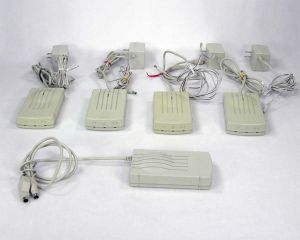 TelePort modems and power adapters, with the Bronze for Performa at the front
 -
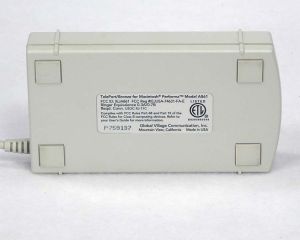 Base label of the TelePort/Bronze for Macintosh Performa, model A861
.jpg)
.jpg)
Related pages
[edit | edit source]- Apple GeoPort Telecom Adapter, Apple's own GeoPort modem adapter
- Apple Data Modem 2400
References
[edit | edit source]- ↑ 1.0 1.1 1.2 1.3 Apple Computer, Tech Info Library article 17907, "Global Village Modems: Frequently Asked Questions", created 8 June 1995, updated 17 January 1997. Copy at absurdengineering.org. Global Village modems bundled with Macintosh Performa computers; TelePort/Bronze fax receive capability; Performa 6100 series, Performa 637 and Performa 560 bundles include receive; upgrades sold by Global Village; serial port in use errors and the files to remove for the TelePort/Bronze and TelePort Gold II; the computer must be on to receive faxes; the hardware works under SoftWindows but the Global Village software does not run under DOS or Windows.
- ↑ 2.0 2.1 Apple Computer, Tech Info Library article 20206, "Performa 5200 & 6200: Upgrade for 14.4 Internal Modem ?", created 25 July 1996, updated 24 September 1996. Copy at absurdengineering.org. Global Village Gold IIv 14.4 kbit/s internal modem bundled with some Performa 5200 and 6200 models; Apple supports only the Global Village modems bundled with specific systems.
- ↑ Wikipedia, "Global Village Communication" (read 4 October 2026). Founded June 1989 in Mountain View; TelePort desktop modems; products bundled with the Macintosh Performa; acquired by Boca Research in 1998; division sold to Zoom Telephonics in 2000. History only.
- ↑ 4.0 4.1 4.2 Apple Rescue of Denver, "Apple ~ Global Village Teleport External Modem (Serial)", product listing with photographs (read 4 October 2026). Models and label model numbers (A861, PL510, A812, A824) and speeds; the Bronze for Performa takes power from the ADB port through a split cable with a keyboard pass-through; other models need an external power adapter. Retailer listing, used for facts read off the products.
- ↑ 5.0 5.1 Apple Computer, Tech Info Library article 17282, "ARA, Performa 611x, and Global Village Gold II Modem", created 27 February 1995, updated 18 May 1995. Copy at absurdengineering.org. The Performa 611x ships with a TelePort Gold II for Performa (14,400 bit/s fax send and receive and 14,400 bit/s data); it needs the GV TelePort Gold II for ARA 2.0 script, found on the hard disk, for Apple Remote Access.
- ↑ 6.0 6.1 Apple Computer, Tech Info Library article 18593, "Performa & TelePort Gold II: Slow With PPP or SLIP", created 18 September 1995, updated 6 February 1997. Copy at absurdengineering.org. Slow PPP or SLIP: select CTS Only handshaking (TelePort software 2.5.2 or later); the TelePort Gold II (not the IIv) uses software-based error correction and data compression; avoid MNP5 on compressed data; disable Xon/Xoff.
- ↑ Apple Computer, Tech Info Library article 18506, "TelePort Gold IIv Modem: Call Arbitration", created 30 August 1995, updated 7 September 1995. Copy at absurdengineering.org. The TelePort Gold IIv internal modem bundled with the Performa 5200 and 6200 arbitrates between GlobalFax and MegaPhone when set to auto-answer after 4 rings.
- ↑ 8.0 8.1 Apple Computer, Tech Info Library article 15653, "ARA: The Correct Global Village TelePort/Bronze Script", created 20 June 1994. Copy at absurdengineering.org. Apple Remote Access with the TelePort/Bronze for Performa: use the Global Village Bronze (ARA 2.0) or Global Village TelePort (ARA 1.0) script, not the ADB script; the Performa modem draws power from ADB but is not an ADB modem like the original TelePort ADB.
- ↑ Wikipedia, "GeoPort" (read 4 October 2026). Global Village produced variants of its compact TelePort modems for Apple Performas that used the GeoPort's ninth pin for power; they were true hardware modems, not GeoPort devices.
- ↑ Apple Computer, Tech Info Library article 16035, "TelePort/Gold and Older Macintosh Computers", created 12 August 1994. Copy at absurdengineering.org. Global Village reports that the TelePort/Gold cannot be used with a Macintosh 128K, 512K or Plus.
- ↑ Apple Computer, Tech Info Library article 17305, "PowerBook: Single Serial Port and GV Teleport II Conflict", created 3 March 1995. Copy at absurdengineering.org. The TelePort II software occupies the single shared serial port on PowerBooks such as the 100, 150, Duo and 500 series, blocking serial printing; disable the modem extension to print.
- ↑ Apple Computer, Tech Info Library article 15655, "TelePort/Bronze Modem: Chooser Shows Unidentified Fax", created 17 June 1994. Copy at absurdengineering.org. Unidentified Fax in the Chooser means the TelePort/Bronze control panel did not load; the red dot test in Fax Center; Option-click for a map of loaded items.
- ↑ Apple Computer, Tech Info Library article 15657, "TelePort/Bronze Modem: Applications Slow Down", created 20 June 1994. Copy at absurdengineering.org. Many waiting or saved faxes slow the computer because the control panel scans the fax folders; remove unwanted faxes from the Spooled Fax folder; virtual memory off and 32-bit addressing on improve fax sending.